
The best Cookiebot alternatives for WordPress in 2026 are DigiConsent for self-hosted privacy, CookieYes for a free and simple banner, Complianz for WordPress-native regional consent, Cookie-Script for a fast hosted scanner, and Termly when you also need policy documents. All five handle GDPR cookie consent and Google Consent Mode v2, so the right pick comes down to whether you want a self-hosted plugin or a hosted service, how many sites you run, and what you can spend.
WordPress owners started leaving Cookiebot for a few concrete reasons. Its August 2025 pricing change roughly doubled the entry per-domain fee, and new signups are now routed to Usercentrics Web CMP, a separate product with session-based billing. Cookiebot also works as a hosted service, so your visitors’ consent data passes through an outside server, which sits awkwardly with the data-minimisation ideas behind GDPR. And once Google tightened Consent Mode v2 enforcement on EEA traffic, plenty of sites saw their analytics break with no warning.
This guide compares the real options side by side, with pricing checked against each vendor for 2026, so you can match a tool to your site instead of guessing. We build DigiConsent, so we will be upfront about where it fits and where a different tool serves you better.
Why are WordPress users switching from Cookiebot?

Cookiebot has managed cookie consent for years and does the core job well, since its automatic scanning catches tracking scripts that manual setups miss and it covers GDPR, CCPA and ePrivacy out of the box. Even so, three things pushed many users to look elsewhere from 2025 onward.
The first reason is cost, and it bites hardest for anyone running more than one site. Cookiebot bills per domain based on how many subpages you have, and its August 2025 update pushed many accounts onto a higher tier. Sites on the old Small plan with fewer than four domains were moved up to the Medium tier automatically, so plenty of owners paid twice as much without touching their setup. Every subdomain still counts as a separate paid domain, so a main site, a blog subdomain and a staging environment become three charges instead of one.
The second reason is data ownership, and it matters more than it first appears. Cookiebot runs as a hosted platform, so its script loads from its servers and your visitors’ consent choices are processed off-site. A consent tool that routes visitor data through a third party is an odd fit for a law built around collecting less data and keeping it close to home.
The third reason is Google Consent Mode v2, mandatory for advertisers targeting the EEA and UK since March 2024 and enforced harder from mid-2025. Sites with broken consent wiring quietly lost conversion tracking and remarketing, often with no warning email. Regulators pushed the same way, with France’s data protection authority once fining Google and Meta a combined 210 million euros for making refusal harder than acceptance. That is why the hunt for a cheaper, more private banner keeps growing.
What are the best Cookiebot alternatives for WordPress in 2026?

Five tools stand out as practical Cookiebot replacements for WordPress, each strong for a different kind of site. The table below sums up who each one suits, and the profiles under it go deeper. Prices are the current 2026 figures from each vendor, checked for this guide.
| Tool | Best for | Starting price | Free version |
|---|---|---|---|
| DigiConsent | Self-hosted, privacy-first WordPress sites | $59/yr, 1 site | Yes, no page limits |
| CookieYes | A quick, easy freemium banner | $10/mo per domain | Yes |
| Complianz | WordPress-native regional consent | $59/yr, 1 site | Yes |
| Cookie-Script | A fast hosted cookie scanner | €6/mo | Yes, 2 domains |
| Termly | Consent plus policy documents | $10/mo, annual | Yes |
DigiConsent, best for self-hosted WordPress sites
DigiConsent is a native WordPress plugin that runs entirely on your own server, so consent records stay in your database and nothing is sent to an outside service. It supports Google Consent Mode v2, blocks scripts by category with ready-made templates for Google Analytics, Meta Pixel and other common tools, and the free version has no page limits or feature gates. DigiConsent Pro is a flat annual license, $59 for one site, $129 for 10 sites and $399 for up to 500 sites, all with no page limits, and the DigiBundle adds every Digi plugin for a single site. It is the best fit when data ownership and page speed matter, and the main trade-off is that you configure scripts yourself instead of leaning on cloud scanning.
CookieYes, best for a quick free banner
CookieYes is one of the most widely used consent plugins on WordPress, and its appeal is speed of setup. You install it, run a scan, and have a working banner within minutes. The free plan covers small blogs and personal sites, while the paid Basic plan starts at $10 per month per domain, billed annually with two months free. It handles Consent Mode v2 and multi-language banners without fuss. The catch is that per-domain billing starts to resemble Cookiebot’s model once you run several sites, and some scanning and styling features sit behind the paid tiers. If you are weighing the two directly, our CookieYes alternative comparison goes further.
Complianz, best for WordPress-native regional consent
Complianz is a WordPress-native plugin built around region-specific consent. It reads the visitor’s location and shows the right notice, an opt-in banner for EU visitors and an opt-out style notice where local law allows it, which keeps you compliant without adding friction for everyone. The free version on WordPress.org handles the essentials, and the Personal plan is $59 per year for one site. It is a strong choice when your traffic spans several legal regions and you want everything managed inside WordPress. Setup asks more questions than a plain banner plugin, because it tailors the notices to the laws you select.
Cookie-Script, best for a fast hosted scanner
Cookie-Script is a hosted consent manager that leans on automatic scanning, so it detects cookies across your pages and builds the banner for you. Setup is quick, and it supports a wide range of languages and regulations. The free tier covers two domains with limited scanning, and paid plans start at 6 euros per month on annual billing. Because it is hosted rather than a self-hosted plugin, the banner script loads from an external service, the same architecture some WordPress owners are trying to move away from. It suits sites that want scanning without managing a plugin.
Termly, best when you also need policy documents
Termly bundles cookie consent with generators for privacy policies, terms and other legal pages, which helps when you are setting up compliance from scratch and do not already have those documents. The free plan includes one policy and a capped number of banner views, and the Starter plan is $10 per month on annual billing. It works on any site through an embed, WordPress included. The trade-off is that it is a hosted service rather than a native plugin, and heavier banner traffic moves you up the paid tiers quickly. Those document generators are the real reason to pick it over a pure consent tool.
How does DigiConsent compare with Cookiebot directly?
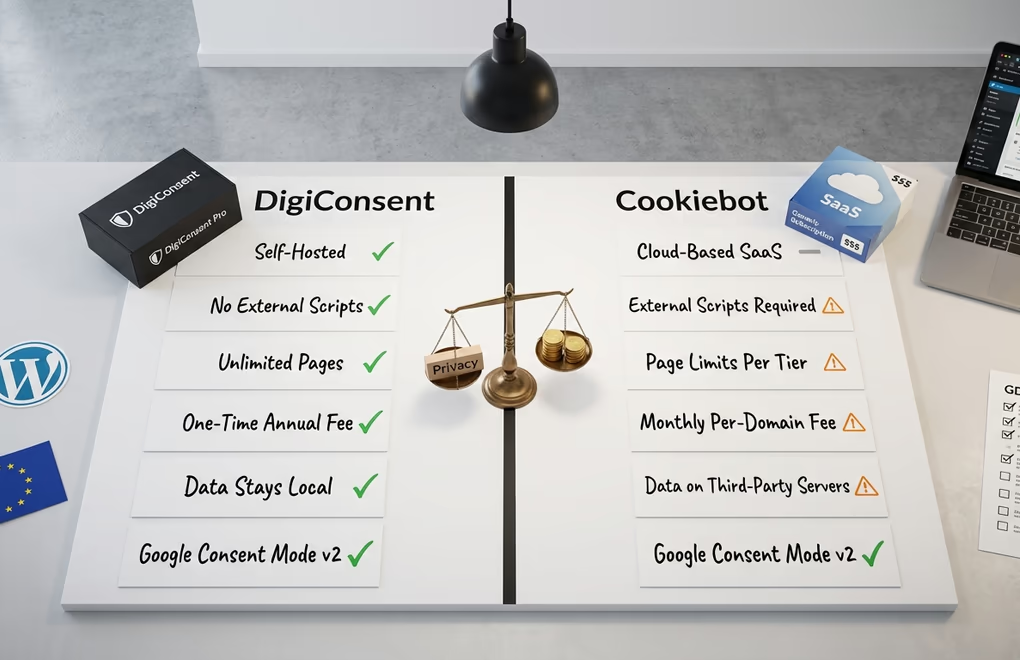
If you have narrowed the choice to staying on Cookiebot or moving to DigiConsent, the differences come down to architecture and cost. Cookiebot is a hosted service that scans your site from the cloud and stores consent on its servers. DigiConsent is a plugin that does the same job inside WordPress, keeping the data and the script on your own domain. That single difference shapes performance, because there is no external script to fetch before your banner appears, and it shapes privacy, because no visitor data leaves your site.
On features the two are close, since both categorise cookies, block scripts until consent, and support Consent Mode v2 with the four required signals. Cookiebot’s automatic scanning is genuinely useful and catches scripts you might forget, which is its clearest edge. DigiConsent uses templates and manual configuration instead, giving you tighter control at the cost of a little setup time.
Cost is the dimension where the two really part ways, and the gap widens with every extra site. Cookiebot bills monthly per domain by subpage count, with Premium plans running from about 7 euros to 90 euros per month, per domain. DigiConsent charges a flat annual license from $59 a year for a single site, with no page limits. For one small site the gap is modest. For an agency running ten client sites, one flat yearly license against ten monthly per-domain subscriptions is a large difference over three years. If page-speed work is already on your list, dropping an external consent script is one fewer third-party request competing with your content.
How do you get Google Consent Mode v2 right?
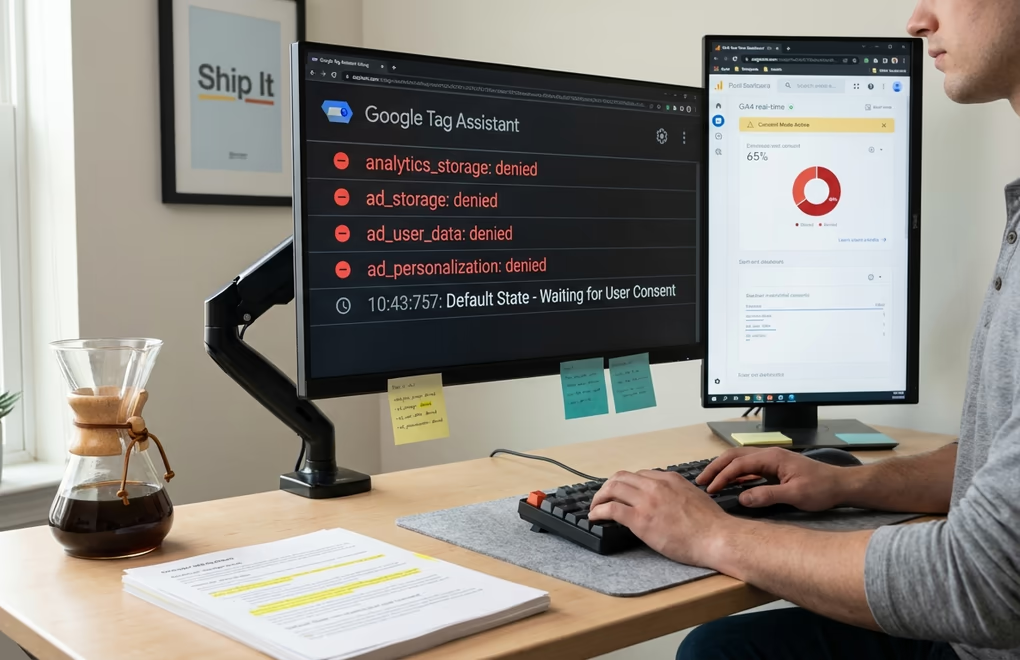
Getting Consent Mode v2 right comes down to sending Google the right signals in the right order, and most broken setups get one of those wrong. It asks your banner to send four signals, ad_storage, ad_user_data, ad_personalization and analytics_storage, based on what each visitor agrees to. When someone declines, those signals should be set to denied, and Google switches to cookieless pings that still feed its modelling without dropping a cookie.
Two common mistakes cause most of the trouble people run into. The first is tags that fire before consent is recorded, so a tracker loads while your banner is still asking, which breaks compliance no matter what the banner says. The second is the wrong default state, granting consent by default in the EEA where the law requires the opposite. Whatever plugin you choose, the fix is the same. Set defaults to denied for regulated regions, make the consent update fire before your tags, and confirm the signals with Google Tag Assistant before you trust the numbers.
A tool that handles Consent Mode v2 well saves you this debugging. DigiConsent includes v2 support in its free version with regional defaults in Pro, CookieYes and Complianz both wire it in, and Cookiebot has supported it for a while. The point is less which brand you pick and more that you confirm the wiring against a full WordPress GDPR compliance checklist, because a banner that looks fine can still send the wrong signal to Google.
Do these alternatives cover privacy laws beyond GDPR?

Yes, every tool in this guide covers the major privacy laws beyond GDPR, and the real difference is how they apply them by region. Nearly twenty US states now have their own privacy laws, Brazil enforces the LGPD, and regions from California to South Africa carry their own requirements. The tools here all cover the big frameworks, GDPR, CCPA and CPRA, LGPD and the ePrivacy Directive, so none of them leaves you exposed on the main laws.
The real difference is how they apply those laws by location. GDPR wants explicit opt-in before any non-essential cookie loads, while California leans toward disclosure and an opt-out instead. Show a strict opt-in banner to a US visitor and you add needless friction, show an opt-out notice to a German visitor and you are breaking GDPR. Region-aware tools like DigiConsent and Complianz detect location and serve the matching notice, which keeps you compliant without dragging down consent rates where the law is lighter.
If most of your traffic is from one country, almost any of these tools is fine, but once it spans the EU and the US, geolocation targeting becomes the feature that keeps you legal in every market at once.
Picking the right Cookiebot alternative for your site
There is no single best Cookiebot alternative, only the one that matches how you run your site. If you want data to stay on your own server and you run WordPress, DigiConsent is the natural pick, and its free version lets you test everything before paying. If you want the fastest possible setup and a free banner for a small site, CookieYes is hard to beat. If your traffic spans several legal regions, Complianz and DigiConsent both handle region-specific consent well. If you also need privacy policies written for you, Termly earns its place, and if you would rather not manage a plugin at all, Cookie-Script’s hosted scanning does the job.
Cookiebot itself still makes sense for enterprises with settled compliance workflows, where switching would cost more than it saves. For most WordPress owners watching per-domain fees and page speed, a self-hosted plugin covers the same ground for less. Try the free version of whichever tool fits, check the Consent Mode wiring, and you will know within an afternoon whether it is the right home for your banner.
Frequently asked questions about Cookiebot alternatives
What is the best free Cookiebot alternative?
For WordPress, DigiConsent and CookieYes both offer genuinely usable free versions. DigiConsent’s free tier has no page limits and includes Consent Mode v2, script blocking by category and consent logging, all self-hosted. CookieYes is quicker to set up and fine for a single small site. Complianz also has a capable free plugin on WordPress.org. Which one wins depends on whether you value data ownership or setup speed more.
Is there an open-source Cookiebot alternative?
Cookiebot is a closed hosted service, so the closest open approach is a self-hosted WordPress plugin whose behaviour you can inspect and control. DigiConsent runs entirely on your server with no external calls, which gives you the transparency and data control people usually want from open source. It is not a community project, but the self-hosted model answers the same concern, that your consent tool should not be a black box sending data elsewhere.
Can I switch from Cookiebot without losing consent records?
Consent records stored by Cookiebot stay on its servers and cannot be imported directly, because each platform stores consent differently. The move itself is simple, you install the new plugin, rescan your cookies, then delete the Cookiebot script so only one banner ever loads. Your new tool starts collecting fresh consent as visitors return, and existing Cookiebot consent stays valid under GDPR until it expires, so there is no compliance gap as long as you never run both banners at once.
Do Cookiebot alternatives support Google Consent Mode v2?
Yes, the main alternatives all support Consent Mode v2. DigiConsent includes it in its free version, and CookieYes, Complianz, Cookie-Script and Termly all support it too. Support on its own is not enough, though, and this is where many setups slip. You still need the four signals firing in the right order and defaulting to denied in the EEA, so test any tool with Google Tag Assistant before you rely on its numbers.
Does a self-hosted cookie plugin still need automatic scanning?
A self-hosted plugin does not strictly need cloud scanning to be accurate. Self-hosted plugins like DigiConsent use pre-built templates for common services such as Google Analytics and Meta Pixel, and you switch on the categories you use. That gives you precise control over what is blocked, at the cost of adding new scripts by hand when you install fresh tools. Automatic scanning is convenient, but manual configuration is often more accurate for a site you know well.
How does switching consent plugins affect my Google Analytics data?
Switching should not cause a lasting drop in GA4 as long as the new plugin implements Consent Mode v2 with the same default states. You might see a short dip while returning visitors re-consent under the new banner. Confirm that analytics_storage and ad_storage fire correctly with Google Tag Assistant before you remove Cookiebot, so you do not lose data during the handover.





0 Comments on "Best Cookiebot Alternatives for WordPress in 2026"