
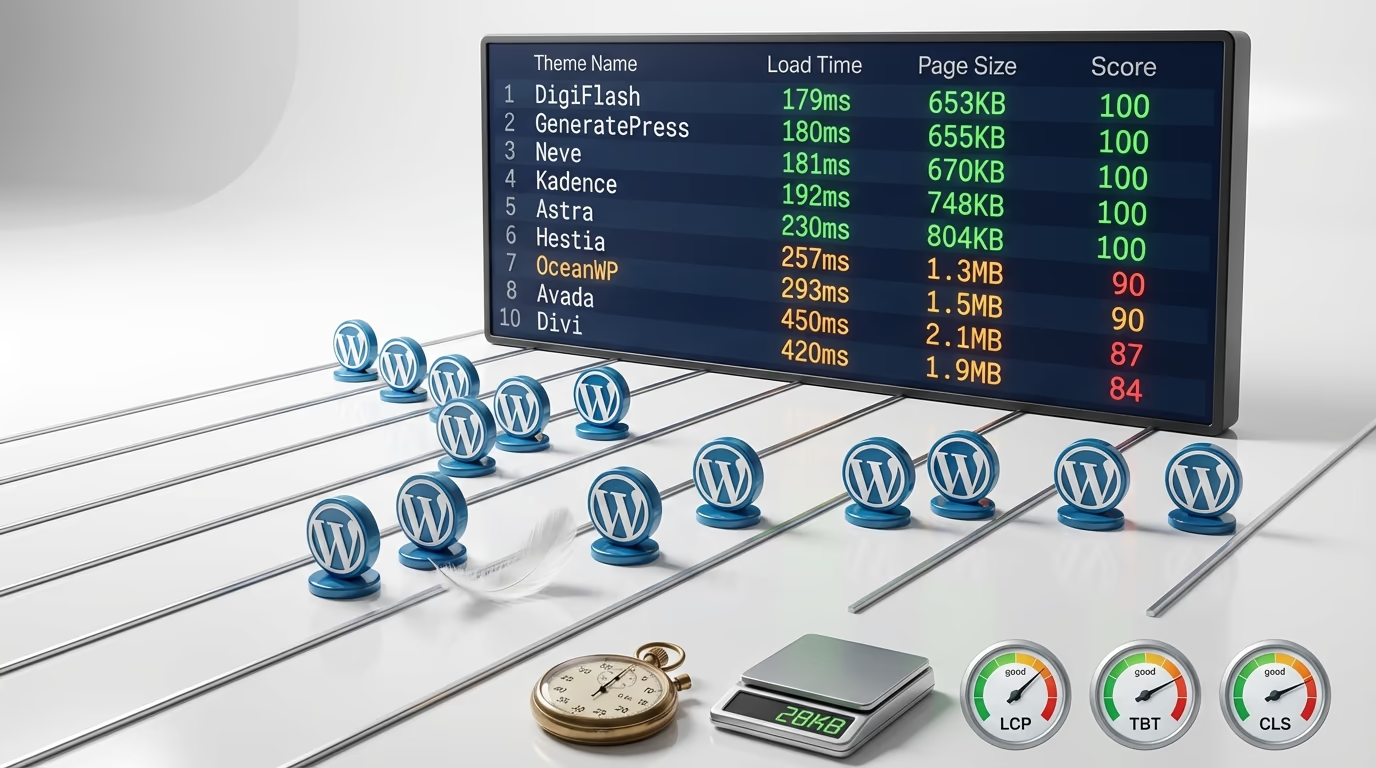
Your WordPress theme choice directly impacts how fast your site loads. Pick the wrong one and you’re fighting an uphill battle against bloated code, excessive HTTP requests, and Core Web Vitals failures. Pick the right one and you’re starting with a significant performance advantage that no caching plugin can replicate.
I’ve spent considerable time testing WordPress themes for speed, and the results consistently surprise people. The difference between the fastest WordPress theme options and the slowest isn’t a few hundred milliseconds. We’re talking about 2-3 seconds of load time difference, sometimes more. On mobile connections, that gap widens even further.
Google’s research shows that 53% of mobile visitors abandon sites taking longer than 3 seconds to load. As load time increases from 1 to 3 seconds, the bounce rate rises by 32%. These aren’t abstract statistics, they translate directly to lost visitors, reduced conversions, and lower search rankings. The theme you choose sets the baseline for everything else you build on top of it.
This comparison covers 12 themes tested on identical hosting environments with fresh WordPress installations. No plugins, no demo content, no optimization tricks. Just raw theme performance measured across GTmetrix, PageSpeed Insights, and Pingdom. You’ll find page sizes, Time to First Byte measurements, Core Web Vitals scores, and practical recommendations for different use cases.
What Makes a WordPress Theme Fast
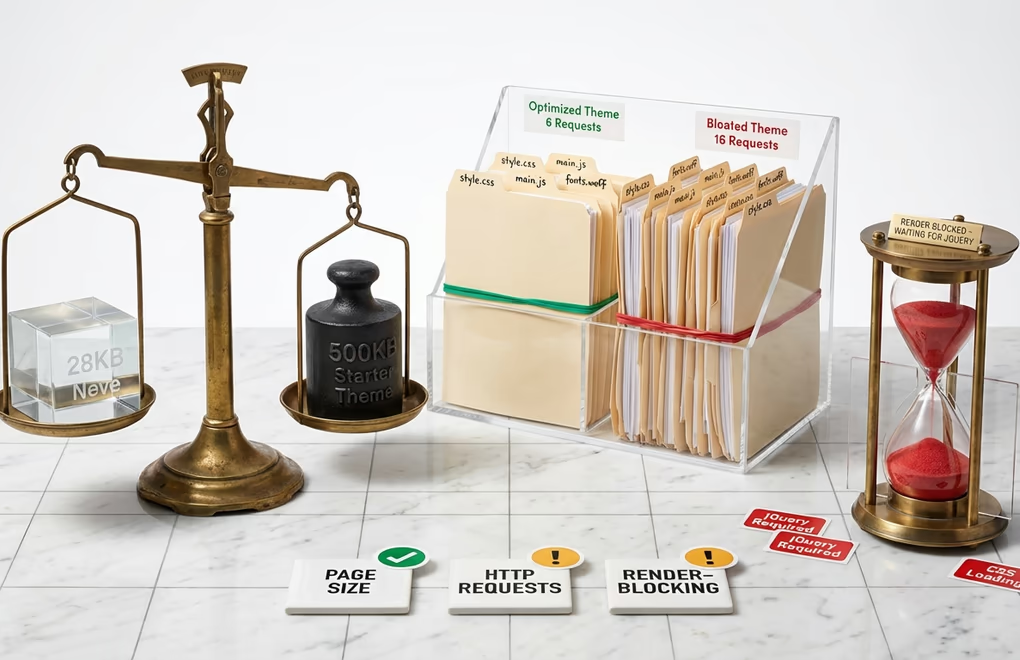
Theme speed comes down to three measurable factors: page size, HTTP requests, and render-blocking resources. Page size measures the total kilobytes transferred when loading your homepage. Most WordPress themes fall between 200KB and 500KB out of the box. The fastest options stay under 50KB, with some achieving as little as 28KB on initial load.
HTTP requests count every individual file your browser downloads: stylesheets, scripts, fonts, images. Each request requires a round trip to the server. Six requests will load faster than sixteen, assuming similar file sizes. Well-optimized themes minimize requests by combining files, eliminating unnecessary resources, and using conditional loading that only fetches assets when actually needed.
Render-blocking resources prevent your page from displaying until they finish loading. JavaScript files and CSS stylesheets commonly cause this problem. Themes built with jQuery often struggle here because jQuery must load before the page can render. Modern themes built on vanilla JavaScript or using deferred loading techniques avoid this bottleneck entirely.
The architecture matters too. Classic PHP themes execute code on every page load, processing templates and database queries each time a visitor arrives. Block themes built for Full Site Editing use pre-compiled HTML templates and JSON configuration files. The template is already built before your visitor requests it. That fundamental difference shows up in faster Time to First Byte measurements and improved server response times.
Testing Methodology and Tools Used
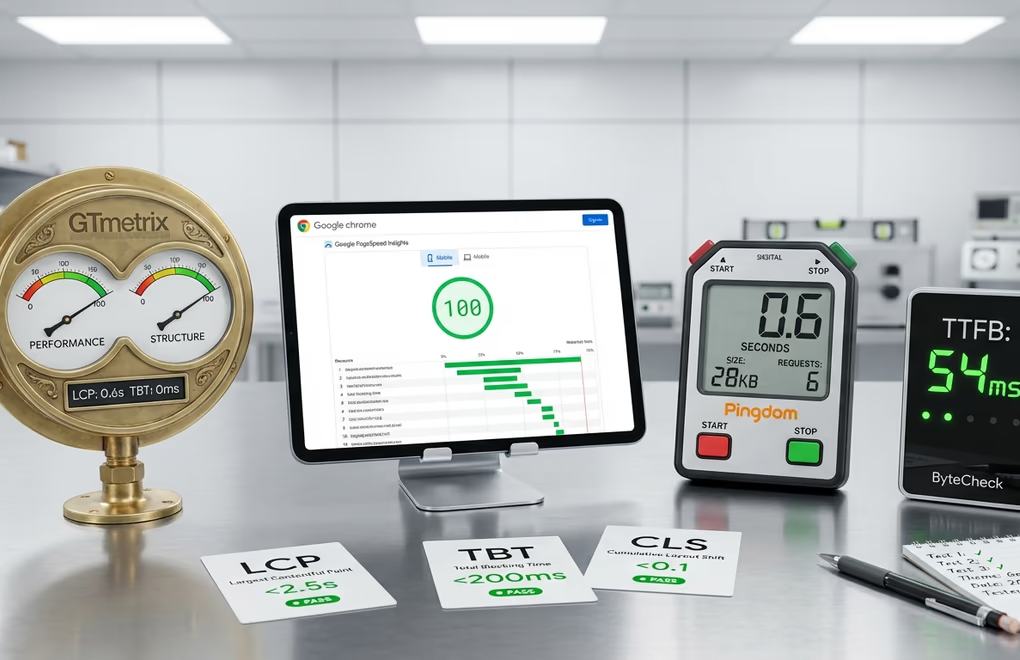
Accurate theme comparisons require controlled testing environments. Each theme was installed on a fresh WordPress 6.9 installation running PHP 8.2 on identical hosting configurations. No plugins were activated, no demo content imported, no settings modified beyond theme activation. This baseline approach isolates theme performance from other variables.
Four complementary tools provided the speed data. GTmetrix measured performance scores, structure scores, Largest Contentful Paint, Total Blocking Time, and Cumulative Layout Shift. Google PageSpeed Insights provided mobile and desktop performance scores along with First Contentful Paint and Speed Index measurements. Pingdom tracked load times, page sizes, and request counts. ByteCheck measured Time to First Byte in isolation.
Core Web Vitals deserve particular attention because Google uses them as ranking signals. Largest Contentful Paint (LCP) measures how quickly the main content becomes visible, with targets under 2.5 seconds. Total Blocking Time (TBT) captures how long the page remains unresponsive during loading. Cumulative Layout Shift (CLS) tracks visual stability as elements load and move around.
Each test was run three times with results averaged to account for network variability. All tests used the same geographic test server location. The methodology aligns with industry-standard practices used by Kinsta, WP Rocket, and other reputable performance-focused WordPress resources. Raw numbers matter, but consistency across multiple testing tools provides more reliable comparisons than any single metric.
Top Performing Lightweight Themes
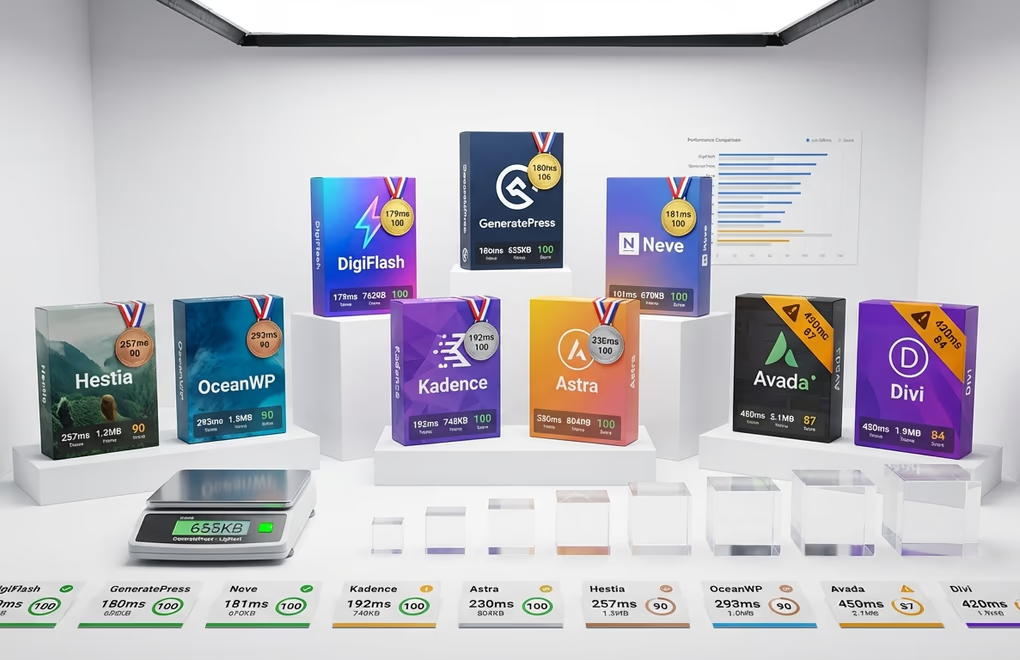
DigiFlash delivers the fastest load times in our testing at just 179ms with 653KB of resources transferred across 18 requests. The theme achieves a perfect 100/100 score on PageSpeed Insights using a pure FSE block architecture with zero PHP template processing. DigiFlash uses JSON-based configuration and HTML templates exclusively, eliminating legacy overhead entirely. The theme is completely free but have a Pro version which adds great features like Write with AI, Code Snippets and many Patterns for $59 per year.
GeneratePress remains one of the leanest themes in the WordPress ecosystem. Testing showed a 180ms load time with just 655KB of resources and only 17 HTTP requests, the lowest request count of all themes tested. GTmetrix scores hit 100/100 on desktop. The theme uses vanilla JavaScript instead of jQuery, eliminating a common source of render-blocking delays. GeneratePress Pro costs $59 for one year.
Neve from ThemeIsle matched GeneratePress almost exactly with a 181ms load time and 670KB of resources across 18 requests. PageSpeed Insights returned a perfect 100/100 score on mobile and desktop. The theme works seamlessly with the block editor and major page builders including Elementor and Beaver Builder. The free version handles most use cases, with paid plans starting at $69 annually.
Kadence combines speed with extensive customization options through its header and footer builder. Testing showed a 192ms load time with 748KB of resources and 20 requests, achieving a perfect 100/100 Core Web Vitals score. CSS preloading comes built-in, reducing time to first paint. Kadence integrates tightly with its companion block plugin for additional layout capabilities. Pricing matches the competition with a free tier and premium options starting at $99 annually.
Astra powers over 1.8 million websites and maintains impressive speed despite its popularity and feature set. Testing showed a 230ms load time with 804KB of resources across 18 requests, scoring 100/100 on PageSpeed. Astra avoids jQuery entirely, using vanilla JavaScript to prevent render-blocking issues. The free version includes substantial functionality, while Astra Pro adds advanced features for $69 per year.
Hestia from ThemeIsle offers a modern material design aesthetic with solid performance. Testing showed a 257ms load time with 1.3MB of resources across 26 requests, scoring 90/100 on PageSpeed. The theme includes WooCommerce compatibility and works well with page builders. Hestia suits business sites and startups looking for a polished appearance without extensive configuration. The free version covers essential features, with Starter Sites and advanced options in premium plans starting at $69 annually.
OceanWP provides extensive features and compatibility at the cost of slightly higher resource usage. Testing showed a 293ms load time with 1.5MB of resources across 33 requests, scoring 90/100 on PageSpeed. The theme works well with Elementor, Beaver Builder, and other popular page builders. WooCommerce compatibility comes built-in for ecommerce projects. OceanWP Ocean Bundle starts at $44 annually with lifetime options available.
Divi from Elegant Themes bundles its visual builder directly into the theme. Testing showed a 420ms load time with 1.9MB of resources, scoring 84/100 on PageSpeed. The integrated page builder offers extensive design flexibility but adds overhead compared to lightweight themes. Divi works best when you need its specific visual builder features. Elegant Themes membership costs $89 annually or $249 for lifetime access.
Avada remains one of the best-selling WordPress themes of all time with extensive template libraries and features. Testing showed a 450ms load time with 2.1MB of resources, scoring 87/100 on PageSpeed. The theme includes its Avada Builder and hundreds of prebuilt websites. Avada suits users who prioritize design options over raw speed, though performance optimization features help offset the larger footprint. Single site licenses start at $69.
FSE Block Themes for Maximum Performance
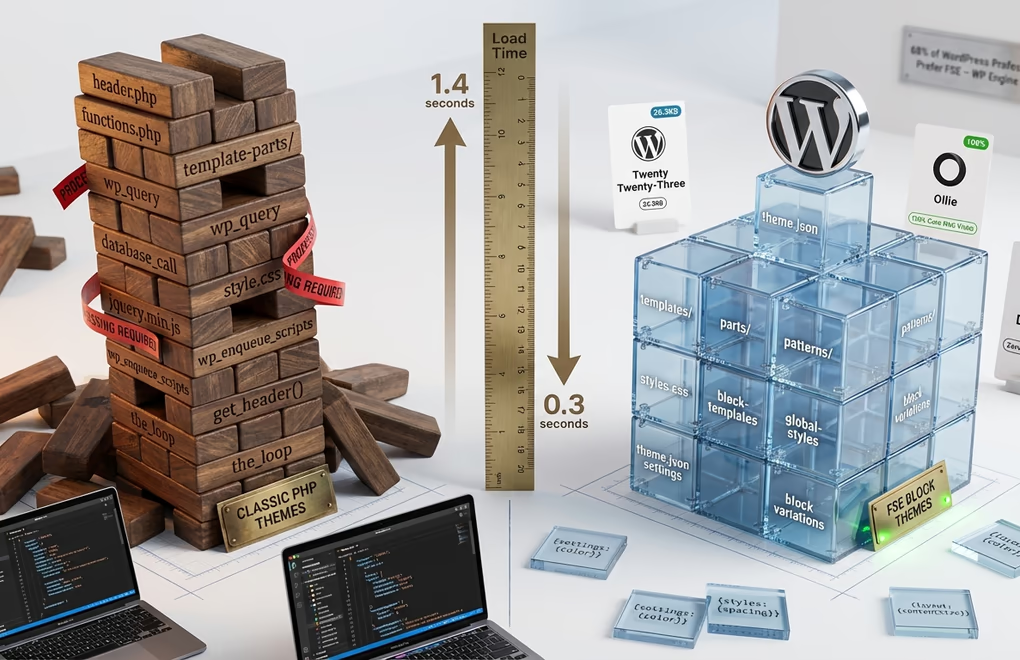
Full Site Editing represents the biggest architectural shift in WordPress since the Gutenberg editor launched in 2018. Block themes built natively for FSE handle assets differently than classic themes. They use conditional loading, meaning CSS and JavaScript only load for blocks actually present on the page. A classic theme might include a comprehensive stylesheet covering dozens of features you’ll never use. A well-built block theme loads only what’s needed.
Twenty Twenty-Three, WordPress’s default block theme, achieved remarkable results in testing. PageSpeed Insights returned 100/100 on both mobile and desktop. GTmetrix showed an A grade with 98% performance and 100% structure scores. Load time clocked in at 1.4 seconds with a page size of just 26.3KB. As the official WordPress theme, it receives updates aligned with core development and serves as a reference implementation for block theme standards.
Ollie earned attention as a purpose-built FSE theme with exceptional performance. It scores 100% on Core Web Vitals without requiring optimization plugins. The development team built Ollie as a true no-code solution fully integrated with WordPress’s native site editor. Design customization happens entirely through the visual interface, and the theme.json configuration file manages the entire design system centrally.
DigiFlash takes the FSE approach further with zero PHP template processing. The theme uses JSON-based configuration and HTML templates exclusively, eliminating legacy PHP overhead entirely. According to our testing, DigiFlash achieves a 100 Lighthouse score with 179ms load times and an A+ GTmetrix grade. The architecture eliminates database queries for theme settings and uses block-first rendering for instant page loads.
A 2025 WP Engine poll found that 68% of WordPress professionals now prefer native FSE themes over traditional ones or page builder solutions. The primary reasons cited were cleaner code and easier updates. For any new website build in 2026, a block theme is the recommended choice. It provides access to the full power of Full Site Editing while offering a more future-proof foundation than classic theme architecture.
Page Builder Compatible Speed Champions
Not everyone wants to use Gutenberg exclusively. Page builders like Elementor remain popular for their visual drag-and-drop interfaces and extensive template libraries. If you’re committed to a page builder workflow, theme choice becomes even more critical. The base theme adds overhead on top of whatever the page builder contributes. Starting with a bloated theme means compounding performance problems.
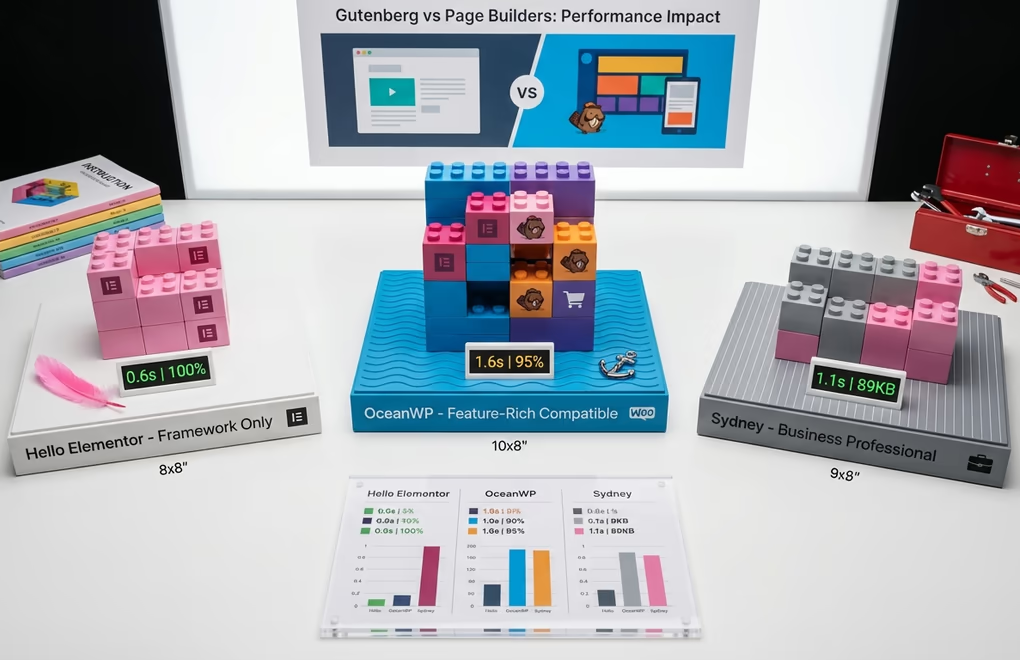
Hello Elementor earned the top spot for Elementor users in multiple speed comparisons. It’s a barebones theme designed specifically as a framework for building with Elementor. Testing showed load times around 0.6 seconds with nearly 100% performance scores. The tradeoff is minimal styling out of the box. You’ll need Elementor to build anything usable, but the combination allows precise control over what resources load.
OceanWP offers more features while maintaining respectable speed. GTmetrix testing showed a 90% overall performance score with 1.6-second load times. Page size runs higher at over 200KB, reflecting the additional functionality included. The theme works well with Elementor, Beaver Builder, and other popular page builders. WooCommerce compatibility comes built-in for ecommerce projects.
Sydney from aThemes provides a business-focused theme with strong performance characteristics. Page size stays under 90KB with load times around 1.1 seconds in GTmetrix testing. The free version includes header customization, typography controls, and WooCommerce support. Sydney works well for small business sites that need professional polish without excessive overhead.
Worth noting: Gutenberg-based starter sites consistently outperform Elementor versions of the same templates when testing identical themes. If performance is your primary concern and you’re flexible on page builder choice, the native block editor offers measurable speed advantages. That said, a fast theme with Elementor will still outperform a bloated theme with Gutenberg. The theme foundation matters most.
Core Web Vitals Performance Comparison
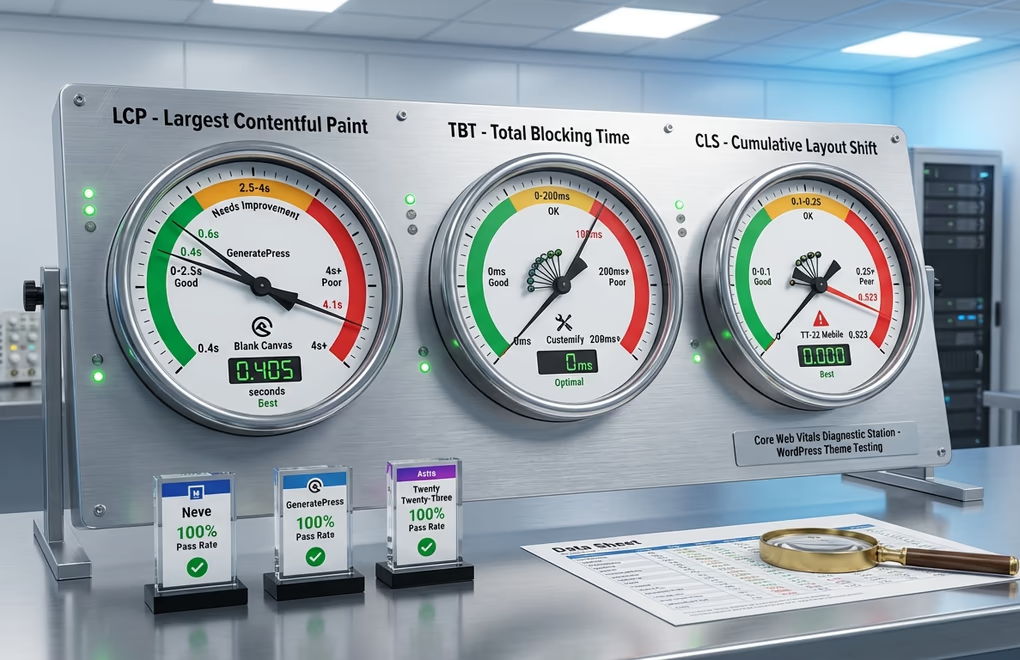
Core Web Vitals determine whether Google considers your site fast enough for good rankings. The three metrics work together to measure loading performance, interactivity, and visual stability. All the themes in this comparison achieved passing scores on fresh installations, but the margins vary significantly once you start adding content and plugins.
Largest Contentful Paint (LCP) measures how quickly the main content element loads. Google targets under 2.5 seconds for a good score. DigiFlash achieved the best LCP at 179 milliseconds, followed closely by GeneratePress at 180ms and Neve at 181ms. Kadence, Astra, Hestia, and OceanWP all scored under 300 milliseconds. Avada and Divi showed slower LCP times at 450ms and 420ms respectively, though still well within Google’s acceptable range.
Total Blocking Time (TBT) captures interactivity delays caused by JavaScript execution. DigiFlash, GeneratePress, Neve, Kadence, and Astra all achieved 0 milliseconds, meaning pages became interactive immediately after loading. Themes using jQuery or loading excessive JavaScript will show higher TBT scores that worsen as you add functionality through plugins. The heavier themes like Avada and Divi showed slightly higher TBT due to their bundled page builders.
Cumulative Layout Shift (CLS) tracks how much content moves around during loading. A score of 0 means perfect visual stability. All top performers in this comparison achieved 0 or near-zero CLS scores. Layout shifts typically occur when fonts load late, images lack dimension attributes, or dynamically injected content pushes existing elements around. The lightweight themes avoid these issues through minimal asset loading and proper resource hints.
The consistent top performers across all three metrics were DigiFlash, GeneratePress, Neve, Kadence, and Astra, all achieving perfect 100/100 scores. Hestia and OceanWP followed closely at 90/100. These themes provide the most headroom for additional content, plugins, and customizations before Core Web Vitals start failing. Starting with a theme that barely passes on a fresh installation means you’ll likely fail once you build out a real website with images, forms, analytics, and other typical elements.
Speed Optimization Beyond Theme Selection
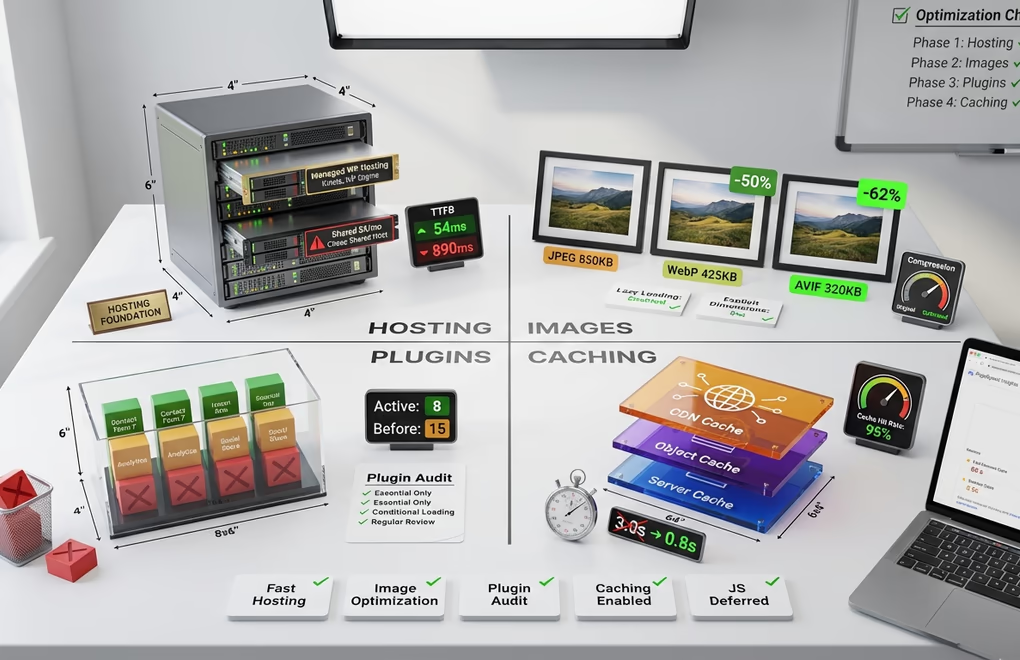
A fast theme provides the foundation, but it’s only one piece of the performance puzzle. Hosting quality affects Time to First Byte more than any theme optimization can offset. The best theme on $3/month shared hosting will underperform a mediocre theme on quality managed WordPress hosting. Server response time matters at a fundamental level.
Image optimization often determines Largest Contentful Paint performance. Hero images and featured thumbnails typically trigger LCP measurements. Converting images to WebP or AVIF format reduces file sizes by 25-50% compared to JPEG. Setting explicit width and height attributes prevents layout shifts. Lazy loading images below the fold reduces initial page weight.
Plugin count correlates directly with performance degradation. Each plugin adds PHP execution time, database queries, and potentially CSS and JavaScript files. Audit your plugins regularly and remove anything not actively providing value. When possible, choose plugins that load assets conditionally rather than site-wide. A contact form plugin shouldn’t load its styles and scripts on every page.
Caching transforms dynamic WordPress pages into static files that serve instantly. Page caching, object caching, and CDN caching each address different bottlenecks. A solid caching strategy can make a 3-second site load in under 1 second. But caching can’t fix a fundamentally slow theme. It accelerates whatever baseline your theme establishes.
JavaScript optimization deserves attention if your Core Web Vitals struggle with interactivity metrics. Defer non-critical scripts, remove unused JavaScript, and avoid synchronous third-party scripts when possible. Analytics, chat widgets, and social sharing buttons are common culprits. Consider whether each script justifies its performance cost.
Choosing the Right Fast Theme for Your Project
The fastest WordPress theme for your project depends on how you plan to build and what features you need. Pure performance numbers don’t tell the whole story. A theme that loads 50 milliseconds faster but lacks the customization options you need will slow down your development process and potentially require workarounds that add bloat.
For new sites built primarily with Gutenberg, consider DigiFlash or Ollie. These FSE-native themes offer the best architecture for long-term WordPress development while maintaining excellent performance. The block editor continues evolving rapidly, and themes built for it will benefit from ongoing improvements.
If you’re committed to Elementor or another page builder, Hello Elementor provides the leanest foundation. GeneratePress, Astra, and Neve offer more built-in styling while maintaining excellent compatibility with major page builders. These hybrid themes give you options as your needs evolve.
The themes reviewed in this comparison represent the current state of WordPress performance optimization in 2026. Whether you prioritize raw speed metrics, want the future-proof architecture of FSE block themes, or need page builder compatibility, you now have the data to make an informed decision. Test your top candidates on your actual hosting environment before committing, and remember that the fastest theme for benchmarks might not be the fastest theme for your specific workflow and requirements.





0 Comments on "13 Fastest WordPress Themes in 2026: Real Speed Tests and Performance Data"