

Cumulative GDPR fines have now surpassed $5.88 billion. That number should make every WordPress site owner pause and reconsider their approach to cookie consent. The days of slapping a generic banner on your site and hoping for the best are definitely over.
Here’s what makes the current landscape particularly challenging: most WordPress cookie consent plugin solutions create more problems than they solve. They charge expensive monthly fees per domain, load scripts from external servers which creates additional privacy concerns, and require complex configuration that assumes you’re a privacy lawyer rather than a website owner trying to stay compliant. The irony is painful when you think about it, because your privacy solution might actually be invading your visitors’ privacy by sending data to third-party servers.
A recent study of the top 10,000 websites across 31 countries found that while 67% display some form of cookie banner, only 15% actually meet basic compliance requirements. The gap usually comes down to missing reject options, scripts loading before consent, or improper consent logging. Google’s July 2025 enforcement of Consent Mode v2 has made things even more complicated, with 67% of implementations now showing technical errors that break conversion tracking entirely.
This guide walks you through everything you need to understand about cookie compliance in 2026, from regional requirements to Google Consent Mode v2 implementation. You’ll also learn how to set up a WordPress cookie consent plugin that actually respects privacy by keeping all data on your own server, while still giving you the flexibility to comply with different regulations in different regions.
Why Your WordPress Site Needs a Cookie Consent Plugin in 2026

The regulatory landscape has shifted dramatically over the past year. The UK’s Information Commissioner’s Office conducted a year-long review of the country’s 1,000 most-visited websites and now reports that more than 95% meet cookie compliance standards. That sounds encouraging until you realize it happened after aggressive enforcement action. The ICO didn’t achieve that compliance rate through polite suggestions.
Google Consent Mode v2 became mandatory for all EEA and UK traffic in July 2025. If your WordPress site serves European customers and you weren’t prepared, your conversion tracking, remarketing, and audience segments stopped working that day. No grace period, no manual review, just automated enforcement based on whether your site properly signals consent state. The four required consent parameters, including ad_storage, ad_user_data, ad_personalization, and analytics_storage, must all be properly configured before any Google tags load.
On January 1, 2026, new CCPA regulations took effect representing the most significant expansion of California privacy requirements since the law’s initial enactment. The California Privacy Protection Agency finalized updated rules in September 2025 that strengthen symmetry requirements and explicitly prohibit dark patterns. If the number of steps to opt-out exceeds the steps to opt-in, you’re now in violation.
The United States now has more than 20 states with comprehensive privacy regimes, with Indiana, Kentucky, and Rhode Island joining the list in 2026. Each state has slightly different requirements, which is why a proper WordPress cookie consent plugin needs geolocation capabilities to show the right consent experience to visitors from different regions. A one-size-fits-all banner simply doesn’t work anymore when California requires opt-out mechanisms while Virginia has different thresholds entirely.
Beyond the legal requirements, there’s a practical business case for proper cookie consent. Sites without compliant consent mechanisms risk having their Google Ads and Analytics data become unreliable or completely unavailable. If you’re running an ecommerce store on WordPress, broken conversion tracking means you can’t optimize campaigns or measure ROI accurately. The compliance investment pays for itself quickly when you consider the alternative.
Understanding Cookie Consent Requirements by Region

The European Union’s GDPR remains the gold standard for strict cookie consent requirements. Under GDPR and the ePrivacy Directive, you must receive users’ consent before using any cookies except strictly necessary ones. This means opt-in consent where nothing loads until the visitor explicitly agrees. You need to provide accurate and specific information about each cookie’s purpose in plain language, and you must document and store all consent decisions. The reject button must be equally prominent as the accept button, and pre-checked boxes are explicitly prohibited.
California’s CCPA and CPRA take a fundamentally different approach. Rather than opt-in consent, California uses an opt-out framework where cookies can be set by default but users must have a clear and easy way to reject them. The required “Do Not Sell or Share My Personal Information” link must be prominently displayed, and under the CPRA amendment, you also need a “Limit the Use of My Sensitive Personal Information” option. Businesses must honor Global Privacy Control signals automatically, even if the user never interacts with your consent banner directly.
The UK maintains similar requirements to GDPR through UK GDPR and PECR (Privacy and Electronic Communications Regulations), though post-Brexit divergence is slowly emerging. Brazil’s LGPD requires explicit consent for cookie collection with clear information about purposes and data sharing. South Africa’s POPIA has similar consent requirements. Canada’s PIPEDA takes a more flexible approach but still requires meaningful consent for non-essential cookies.
This patchwork of regulations explains why generic one-size-fits-all solutions fail. Showing an opt-in banner to California visitors when opt-out is sufficient creates unnecessary friction and hurts conversion rates. Showing an opt-out banner to EU visitors violates GDPR. The solution requires a WordPress cookie consent plugin with proper geolocation targeting that can detect visitor location and adjust the consent experience accordingly. Without this capability, you’re either over-restricting some visitors or under-complying for others.
Looking ahead, the EU is preparing significant updates to its cookie consent framework. The European Commission has proposed changes aimed at reducing “cookie fatigue” through browser-level consent mechanisms. A simplified consent mechanism requiring just one click to accept or reject is being proposed, with mandatory “Reject all” buttons equivalent in prominence to “Accept all.” Optimistic scenarios suggest adoption by late 2026 with implementation in 2027, but current requirements remain in full force until then.
Google Consent Mode v2: What WordPress Site Owners Must Know

Google Consent Mode v2 represents one of the biggest changes to analytics and advertising tracking in years. Released to comply with the Digital Markets Act and enforce EU user consent policy, it fundamentally changes how Google services interact with user consent on your WordPress site. Understanding this system is now essential for anyone running Google Analytics or Google Ads.
The system works through four key consent parameters that your WordPress cookie consent plugin must properly signal to Google. The ad_storage parameter controls advertising cookies. The ad_user_data parameter controls whether user data can be sent to Google for advertising purposes. The ad_personalization parameter controls personalized advertising. Finally, analytics_storage controls analytics cookies. Each parameter can be set to either granted or denied, and your consent management platform must update these values in real-time as users make their choices.
There are two implementation modes to understand. Basic Consent Mode sends no data to Google when users deny consent, which is fully compliant but loses all non-consented user data. Advanced Consent Mode sends cookieless pings to Google even when consent is denied, enabling conversion modeling to recover some measurement data. Advanced mode is more complex to implement but preserves more analytics capability while still respecting user choices.
The troubling statistic is that 67% of Consent Mode v2 implementations have technical errors. Most commonly, sites default to “granted” before users actually choose, which violates both GDPR and Consent Mode requirements. Only 23% of implementations successfully recover the promised 65% of lost data through conversion modeling. The problem usually traces back to consent signals not firing before Google tags load, or the parameters not updating correctly when users change their preferences.
A properly configured WordPress cookie consent plugin handles all of this automatically. When a visitor arrives, the default consent state should be set to denied for all four parameters. Your banner appears, the user makes their choice, and the plugin immediately updates the consent state and fires the appropriate Google tags. This sequence must happen correctly every time, on every page load, regardless of caching. If you’re selling digital products through WordPress, getting this right directly impacts your ability to measure and optimize your sales funnel.
DigiConsent: The Privacy-First WordPress Cookie Consent Plugin
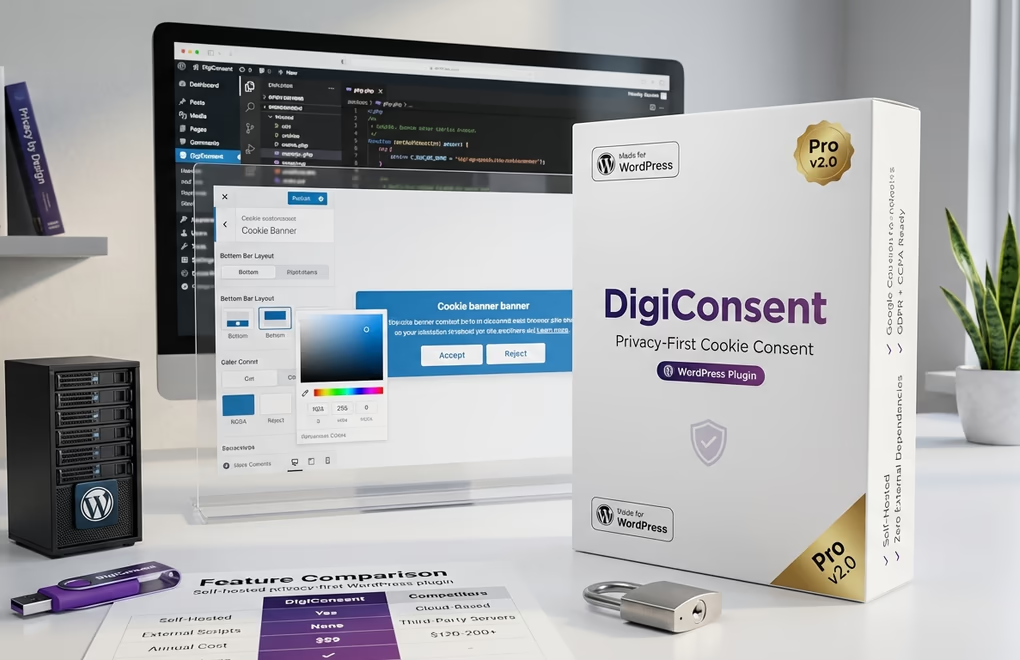
DigiConsent takes a fundamentally different approach to cookie consent management. Built with privacy as the foundation rather than an afterthought, it runs entirely on your WordPress server with zero external dependencies. Your consent data never leaves your WordPress database. No third-party scripts, no external API calls, no privacy-compromising SaaS integrations sending visitor information to servers you don’t control.
The free version includes everything most WordPress sites need for basic cookie compliance. You get beautiful, customizable cookie banners with multiple position options including bottom bar, top bar, side panel, and fullscreen overlay. The design customization goes deep with RGBA color support, multiple animation types like slide, fade, and zoom, adjustable animation speeds, and the ability to add your own logo. Every visual aspect can be matched to your brand without touching code.
Cookie management is organized into four logical categories: Essential, Analytics, Marketing, and Functional. Each category can be enabled or disabled, and users can grant granular consent to individual categories through the settings modal. The plugin includes quick script templates for common services like Google Analytics 4, Google Tag Manager, Facebook Pixel, Hotjar, LinkedIn Insight Tag, TikTok Pixel, Google Maps, reCAPTCHA, Intercom, and Zendesk Chat. These templates only activate when you configure the service ID and when visitors consent to the relevant category.
Google Consent Mode v2 support is built directly into the free version. You can enable it with a single toggle, set your default consent state, and the plugin handles all the technical implementation automatically. Consent logging captures every decision with timestamps, IP addresses (optional), user agents, and specific consent choices. These logs can be viewed in the dashboard and exported for compliance audits with configurable retention periods.
The analytics dashboard shows acceptance rates, rejection rates, and trends over time. You can see which cookie categories users accept most frequently, track consent by device type, and identify patterns that might indicate problems with your banner design or messaging. This data helps you optimize both compliance and user experience simultaneously.
DigiConsent Pro at $59 per year unlocks advanced features for sites with international audiences or complex compliance requirements. The headline feature is geolocation targeting using MaxMind GeoLite2 databases that run locally on your server. You can target all 195 countries, automatically detect EU/EEA visitors, and even target specific US states for CCPA, VCDPA, and other state-level compliance. Create custom location rules with completely different consent behaviors, banner designs, and button configurations per region.
Pro also adds advanced behavior controls that give you fine-grained control over when and how the banner appears. Set a display delay to show the banner after a specified number of milliseconds, or trigger display after the user scrolls a certain percentage of the page. The page lock feature prevents any interaction until consent is given, while the blur effect option obscures page content until users make their choice. You can even set auto-hide to dismiss the banner after a configured number of seconds.
Custom script management in Pro lets you inject JavaScript into the head, body, or footer sections of your pages, with each script assigned to a specific cookie category so it only executes after consent. Hero media support adds visual impact with images or videos in your banner, including autoplay, loop, and mute controls for video. The floating manage consent button gives returning visitors an easy way to update their preferences without hunting for a settings link.
Setting Up DigiConsent on Your WordPress Site

Getting DigiConsent running on your WordPress site takes just a few minutes. Start by going to Plugins, then Add New in your WordPress admin. Search for DigiConsent, click Install Now, and then Activate. Alternatively, download the plugin from WordPress.org and upload it manually to your wp-content/plugins directory.
Navigate to DigiConsent in your admin sidebar to access the settings. The Settings tab is where you’ll configure your banner layout, position, and all the text content. Choose your preferred layout from bottom bar, top bar, side panel, or fullscreen overlay. Select left or right positioning for applicable layouts. Customize the pre-heading text, main heading, description, and all button labels to match your brand voice and legal requirements.
The Design tab controls all visual aspects. Set your background color, text colors for pre-heading, heading, and body text, and configure each button’s normal and hover states separately. Choose your button style, border radius, and whether to show a box shadow. Pick an animation type and speed, add your logo with custom dimensions, and for fullscreen layouts, set the overlay opacity. The color picker supports full RGBA values so you can use transparency effects.
The cookie category tabs, which include Necessary, Analytics, Marketing, and Functional, are where you add your tracking scripts. Each category has its own configuration page where you can enable or disable the category, set its default state, customize the name and description that users see, and add scripts using the quick templates or your own custom code. For Google Analytics, just enter your GA4 Measurement ID. For Facebook Pixel, enter your Pixel ID. The plugin generates properly formatted code that only executes after the user consents to that category.
Enable Google Consent Mode v2 on the Settings tab. Set the default consent state to denied for GDPR compliance, or granted if you’re only serving regions with opt-out requirements. The plugin automatically signals the correct consent state to Google based on user choices, updating in real-time when preferences change.
Set your consent behavior to match your compliance requirements. Opt-in blocks all non-essential cookies until consent is given and works for GDPR. Opt-out allows cookies by default but lets users reject them, which is appropriate for CCPA. Notice-only displays informational banners without blocking functionality. If you upgrade to Pro, you can set different consent behaviors per region through geolocation rules, showing opt-in to EU visitors and opt-out to US visitors automatically.
Test your implementation thoroughly before going live. Visit your site in an incognito window to see the banner as new visitors would. Test accepting all cookies, rejecting all cookies, and using the granular settings modal. Verify that your analytics and marketing scripts only fire after consent. Check the consent logs in your dashboard to confirm everything is being recorded properly. The plugin works with all major caching solutions including WP Rocket, W3 Total Cache, and WP Super Cache because the banner renders client-side.
Common Cookie Consent Mistakes That Lead to Fines

Pre-checked consent boxes remain one of the most common violations despite being explicitly prohibited under GDPR for years now. Any checkboxes for non-essential cookie categories must be unchecked by default. The user must take affirmative action to opt in. This seems obvious, but regulators continue to find sites using pre-selected options, often because developers copied old code or didn’t understand the requirements. DigiConsent sets all non-essential categories to unchecked by default specifically to prevent this issue.
Missing or hidden reject buttons trigger enforcement action regularly. GDPR requires that rejecting cookies be as easy as accepting them. A large, colorful “Accept All” button paired with a tiny, gray “Manage Settings” link buried in the corner doesn’t meet this standard. The 2026 CCPA updates explicitly prohibit asymmetric experiences where opting out requires more steps than opting in. Your WordPress cookie consent plugin should display accept and reject buttons with equal visual prominence.
Loading tracking scripts before consent completely undermines your compliance posture. It doesn’t matter how beautiful your consent banner looks if Google Analytics already fired when the page loaded. This is the most technically challenging aspect of cookie compliance because it requires proper script blocking and conditional loading. Many WordPress sites have tracking code hardcoded in theme files or added through other plugins that bypass the consent mechanism entirely. You need to audit your site thoroughly and ensure all non-essential scripts route through your consent management system.
Not keeping consent records leaves you unable to demonstrate compliance if questioned by a regulator. GDPR requires that you can prove consent was given freely, specifically, informed, and unambiguously. This means logging what choices were made, when they were made, and what information was provided at the time. DigiConsent’s consent logging feature captures all this automatically with configurable retention periods up to 730 days.
Dark patterns that manipulate users into accepting cookies are now explicitly addressed in regulations. Techniques like making the reject button smaller, using color psychology to make accept more appealing, adding extra steps to rejection, or using confusing language all violate the spirit and increasingly the letter of privacy laws. The 2026 CCPA updates specifically state that agreements obtained through dark patterns don’t constitute valid consent. Keep your WordPress site secure and your consent mechanisms honest.
Using consent solutions that send data to external servers creates a privacy paradox worth considering. If your cookie banner plugin phones home to a third-party server with information about your visitors, you’re potentially violating the very privacy principles you’re trying to uphold. Some popular consent solutions set their own tracking cookies and transmit data to their cloud infrastructure. A self-hosted solution like DigiConsent avoids this problem entirely because everything runs on your own WordPress server.
Ignoring Global Privacy Control signals violates CCPA for California visitors. GPC is a browser-level setting that automatically communicates a user’s privacy preferences. Under CCPA, businesses must honor these signals even if the user never interacts with your consent banner. Your WordPress cookie consent plugin needs to detect and respond to GPC signals appropriately, treating them as valid opt-out requests. If your site gets hacked, compliance becomes the least of your worries, but under normal operation you need systems that respect all valid consent signals.
Taking Control of Your Cookie Compliance
Cookie compliance in 2026 requires more than a basic banner. Between GDPR enforcement, Google Consent Mode v2 requirements, expanding US state privacy laws, and the technical complexity of proper script blocking, WordPress site owners need sophisticated tools that don’t require a law degree to configure correctly.
The self-hosted, privacy-first approach matters more than most site owners realize. When your consent solution runs entirely on your own server, you maintain complete control over visitor data. No third-party servers receive information about who visits your site or what choices they make. This philosophical alignment with privacy principles strengthens your compliance posture beyond just checking regulatory boxes.
DigiConsent offers this approach at a price point that makes sense for WordPress sites of all sizes. The free version handles basic compliance needs with full Google Consent Mode v2 support, consent logging, and extensive customization. DigiConsent Pro at $59 per year, significantly less than alternatives like Cookiebot or CookieYes that charge $120 to $200 or more annually per domain, adds geolocation targeting for regional compliance, advanced behavior controls, and custom script management for complex implementations.
Start by downloading the free version from WordPress.org and configuring it for your site’s basic needs. Monitor your consent analytics to understand how visitors interact with your banner. As your compliance requirements grow or your audience becomes more international, upgrading to Pro gives you the geolocation and advanced features needed to handle complex multi-regional compliance without switching platforms.
What aspect of cookie compliance are you finding most challenging to implement on your WordPress site?



0 Comments on "WordPress Cookie Consent: Complete GDPR & CCPA Compliance Guide for 2026"