

The subscription economy hit $555.92 billion in 2025 and shows no signs of slowing down. By 2033, analysts project this market will surge past $1.5 trillion. For anyone considering a WordPress membership site, this represents a massive opportunity that most are completely ignoring.
The numbers tell a compelling story. Nearly seven percent of membership businesses bring in seven figures annually, and almost two-thirds report their income increased over the past year. The average member sticks around for about a year and generates hundreds of dollars in lifetime value. These aren’t theoretical projections from some marketing deck. They’re real results from real membership sites operating right now.
WordPress powers nearly half of all websites on the internet, yet only a fraction leverage recurring revenue models. The technical barrier used to be legitimate. Building a membership site required custom development, expensive plugins, and ongoing maintenance headaches. That’s changed dramatically. Modern WordPress membership plugins handle the heavy lifting, letting you focus on what actually matters: creating content your members will pay for month after month.
This guide covers everything you need to build a WordPress membership site that generates consistent revenue. We’ll walk through plugin selection with current 2026 pricing, content strategies that reduce churn, pricing models that maximize lifetime value, and the technical setup that keeps everything running smoothly. Whether you’re starting from scratch or converting an existing site, you’ll have a complete roadmap by the end.
Why Membership Sites Outperform One-Time Sales

The math behind recurring revenue explains why smart business owners obsess over it. Acquiring a new customer costs significantly more than retaining an existing one. When you sell a $50 ebook, you need to find another buyer tomorrow. When you sell a $25/month membership, that same customer generates $300 in their first year alone, and potentially far more over their lifetime if you keep them engaged.
Predictability changes everything about how you run your business. With one-time sales, revenue spikes and crashes based on launches, promotions, and market timing. When you have a solid base of paying members with strong retention, you can project your income for the next quarter with remarkable accuracy. That stability lets you invest in better content, hire help, and grow without the constant anxiety of wondering whether next month will pay the bills.
The relationship dynamic shifts too. One-time buyers are transactional, members become invested in your success because they’re paying for ongoing access. They provide feedback, participate in communities, and often become your best advocates. The vast majority of membership sites reported increased revenue last year, and businesses offering retention features like pause options and tiered pricing maintained renewal rates well above 90%.
WordPress makes this model accessible to anyone willing to put in the work. You don’t need to build custom software or rely on expensive SaaS platforms that take a cut of every transaction. The WordPress ecosystem provides everything from content protection to payment processing, often at a fraction of what hosted solutions charge. If you’re already familiar with WordPress editing with Gutenberg, you can have a membership site running within a day.
Choosing the Right WordPress Membership Plugin in 2026
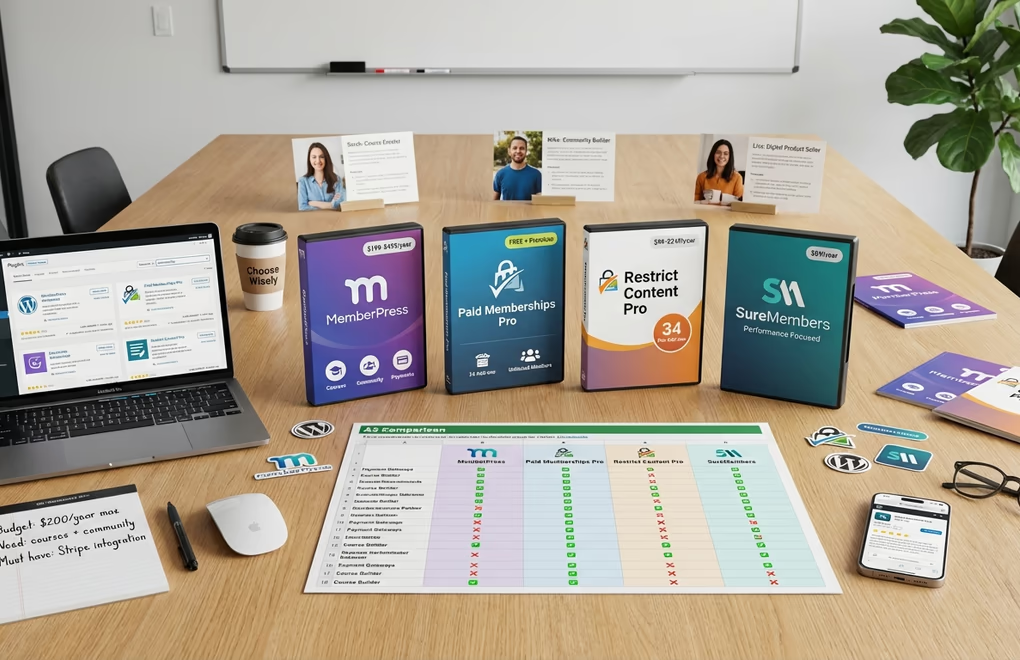
The WordPress membership plugin landscape has matured significantly. You’re no longer stuck choosing between bloated solutions and underpowered alternatives. Current options range from full-featured platforms with course builders and community features to lightweight tools that do one thing exceptionally well. Your choice depends on what you’re actually building.
MemberPress remains the most feature-complete option for serious membership businesses. Their pricing restructured recently, with the Launch plan at $199.50/year covering unlimited courses and Stripe processing, though it includes a 4.9% transaction fee. The Growth plan at $349.50/year eliminates transaction fees entirely and adds community features, coaching tools, and multiple payment gateways including PayPal and Square. Their Scale plan at $499.50/year includes an affiliate system and developer API access. All plans include a 14-day money-back guarantee.
Paid Memberships Pro takes a different approach with a genuinely useful free version. The free tier includes over 30 add-ons, unlimited members, and all major payment gateways. Their Standard plan runs $174 for the first year ($347/year regular) and adds premium support plus 20+ additional add-ons for a single site. The Plus plan at $299 first year ($597/year regular) covers two sites and includes priority support and advanced features like member directories, payment plans, and content dripping. They also offer a Plus Hosting option that bundles optimized WordPress hosting with the full plugin suite.
Restrict Content Pro uses a tiered pricing structure based on site licenses and add-on access. Personal runs $99/year for one site with 13 free add-ons. Plus costs $149/year for up to five sites, also with free add-ons only. Professional at $249/year covers unlimited sites and unlocks all 23 Pro add-ons. They also offer an Ultimate lifetime option at $749 for those who prefer one-time payment with lifetime updates and support. The free version lacks critical features like payment gateway support beyond PayPal, making the paid version essentially mandatory for real businesses.
SureMembers positions itself as a performance-focused alternative. Their Starter plan starts at $69/year for one site, Pro runs $149/year for ten sites, and Business costs $199/year for up to 100 sites. A Business Lifetime option at $599 offers one-time payment for lifetime access. The plugin emphasizes minimal performance impact and a simplified approach using ‘Access Groups’ instead of complex rule systems. It’s worth considering if site speed is a primary concern, though it lacks some advanced features found in competitors.
For those selling digital products alongside memberships, comparing specialized eCommerce plugins becomes important. DigiCommerce offers a compelling alternative at $59/year that includes subscriptions, course building, booking, and abandoned cart recovery in one package. Unlike piecing together multiple plugins, you get an integrated system where subscriptions, digital product delivery, and member management work seamlessly together.
Content Strategies That Keep Members Subscribed

A membership site lives or dies by its content strategy. Getting that first payment is the easy part. Keeping members subscribed month after month requires delivering consistent value that justifies the ongoing cost. Healthy membership sites keep annual churn in the single digits, with exceptional performers maintaining nearly all their members year after year. The difference between these tiers often comes down to content planning.
If you’re teaching topics with clear learning objectives and defined outcomes, structuring content as courses makes sense. Members appreciate the progression from beginner to advanced, and completion milestones create psychological investment in continuing. The online education market has grown massively, with courses ranking as the top revenue stream for six-figure creators according to recent industry surveys.
Live sessions differentiate membership sites from static content libraries. Hosting a monthly live Q&A transforms the dynamic even if only ten people show up in real-time. The replay views typically far exceed live attendance, and members feel seen when they can interact directly with you. These sessions build trust that static content simply can’t replicate. The key is consistency: schedule lives at predictable times so members know when to show up.
Community features keep members subscribed long after they’ve consumed your course content. Discussion forums, comment sections, and direct messaging create connections between members that become sticky. People stay subscribed because leaving means losing access to their community, not just your content. Nearly half of membership sites now offer coaching or consulting as additional value, while over a third include digital products and in-person events.
Templates, checklists, and downloadable resources provide instant wins that members love. A well-designed template feels like skipping the line. These assets can include fillable PDFs, spreadsheets, Canva templates, or Notion dashboards that help members implement what they learn. Quick reference materials like cheat-sheets let people take action immediately and refer back to key information without rewatching entire videos.
Record everything and build an archive. Live sessions, workshops, interviews, and special events should all be saved and organized for members who missed them. Over time, this back catalog becomes incredibly valuable. New members joining today can access years of accumulated content, making the membership more attractive with each passing month. Using AI tools for content creation can help you maintain a consistent publishing schedule without burning out.
Pricing Your Membership for Maximum Revenue

Pricing triggers more anxiety than any other aspect of launching a membership site. Set it too low and you’ll struggle to cover costs while attracting members who don’t value what you offer. Set it too high and you’ll limit growth. The data provides useful benchmarks, but ultimately your pricing should reflect the transformation you deliver.
Current market data shows the $25 to $49 per month range dominates, making it the most popular pricing bracket by far. The next most common tier falls between $15 and $24 monthly. For B2B memberships targeting businesses rather than consumers, pricing runs higher, with many charging between $50 and $99 per month. Average membership prices have climbed noticeably over the past couple years as creators recognize the value they deliver.
Annual pricing deserves serious consideration. Offering a yearly option at 10-12 months price provides upfront cash flow and typically attracts more committed members who churn at lower rates. A $49/month membership might offer annual billing at $490, giving members two months free while you collect a year’s worth of revenue immediately. This improves your cash position and reduces the monthly decision point that causes cancellations.
Tiered memberships let you serve different segments without leaving money on the table. A basic tier might include access to your content library and community. A premium tier adds live coaching calls and direct access. An elite tier includes one-on-one time and priority support. Each tier should represent genuine additional value, not artificial restrictions on what you’d give everyone anyway.
Free trials can work but require careful implementation. Offering 7-14 days of free access lets potential members experience your content before committing. The risk is attracting people who consume your best content during the trial with no intention of paying. Some membership owners prefer offering a low-cost trial period (like $1 for the first month) that filters out purely curious browsers while lowering the barrier to entry.
Member-exclusive discounts create tangible dollar value. If your membership includes discounts on software, services, or products members would buy anyway, the savings can exceed the membership cost. This makes joining a financial no-brainer rather than an expense to justify. Consider partnerships with complementary businesses that benefit from exposure to your audience.
Technical Setup: Payments, Security, and Performance

The technical foundation of your membership site affects everything from conversion rates to member satisfaction. Getting payments, security, and performance right from the start prevents painful migrations later. Modern WordPress membership plugins handle most complexity, but understanding the underlying systems helps you make better decisions.
Stripe remains the gold standard for membership payments. Their rates hover around 3% per transaction for domestic cards, with international transactions costing a bit more. One major advantage: Stripe processes payments on your site without redirecting customers elsewhere, which significantly improves conversion rates. They also handle subscription billing natively, managing failed payment retries and dunning emails automatically.
PayPal should be offered alongside Stripe rather than as a replacement. Many customers prefer PayPal for the buyer protection and familiarity. PayPal fees run slightly higher than Stripe for most transactions, and international payments cost more still. They recently increased fees for their Pay Later options, reflecting the growing demand for buy-now-pay-later services.
Performance directly impacts both conversion rates and member experience. Studies consistently show that every additional second of load time increases bounce rates and reduces conversions. Your membership site should load in under 2 seconds on desktop and under 3 seconds on mobile. This requires optimized hosting, efficient themes, and smart caching. Using a purpose-built theme like DigiFlash eliminates the bloat that slows down most WordPress sites, loading only the CSS and JavaScript actually needed for each page.
Security requires attention but shouldn’t cause paralysis. PCI DSS compliance sounds intimidating, but most WordPress membership sites qualify for SAQ A, the simplest compliance level, because they don’t store credit card data directly. Using payment processors like Stripe and PayPal means they handle the sensitive data while you focus on your content. Essential security measures include SSL certificates (non-negotiable for any site accepting payments), strong password policies, two-factor authentication for admin accounts, and regular updates to WordPress, themes, and plugins.
Content protection keeps your paid materials away from non-members. Most membership plugins handle this automatically, but understand what you’re protecting against. Determined pirates will screenshot, screen record, or copy anything valuable. Your goal is preventing casual sharing and making the member experience convenient enough that paying beats the hassle of trying to access content illegally. Drip content, where materials unlock over time rather than all at once, both prevents content dumps and keeps members subscribed longer.
Email integration connects your membership with your broader marketing efforts. When members sign up, they should automatically join your email list. When they cancel, you should trigger win-back sequences. Most membership plugins integrate with major email platforms including MailChimp, ConvertKit, ActiveCampaign, and others. Setting up proper email marketing for WordPress ensures you can nurture relationships beyond the membership portal itself.
Reducing Churn and Increasing Lifetime Value

Churn is the silent killer of membership businesses. A modest monthly churn rate might seem small until you realize it compounds into losing half your members every year. The math works against you: you need to constantly add new members just to maintain your current base. Reducing churn by even a couple percentage points has a more dramatic impact on annual revenue than almost any acquisition strategy.
Onboarding determines whether new members become long-term subscribers or quick cancellations. The first 30 days are critical. Members who engage with content during their first week stay subscribed dramatically longer than those who don’t. Send a welcome sequence that guides new members to your best content. Show them exactly where to start and what to do next. Create a ‘quick win’ they can achieve in their first session that demonstrates the value they’re paying for.
Pause options give members an alternative to canceling entirely. Life happens, and sometimes people need to step away temporarily. Offering a one to three month pause option retains members who would otherwise cancel and never return. Businesses offering pause features, tiered pricing, and loyalty incentives consistently maintain renewal rates well above ninety percent. This single feature can significantly reduce voluntary churn.
Failed payment recovery prevents involuntary churn from expired cards and bank issues. Smart dunning sequences retry failed payments at optimal intervals and send reminder emails prompting members to update their payment information. A surprising portion of churn comes from payment failures rather than intentional cancellations. Automated recovery can reclaim a significant chunk of this revenue without requiring manual intervention.
Exit surveys reveal why members actually leave. When someone cancels, ask them a simple question about their reason. Common responses include ‘not using it enough,’ ‘too expensive,’ ‘found an alternative,’ or ‘got what I needed.’ These insights help you improve your offering and create targeted win-back campaigns. Sometimes a simple discount offer or reminder of unused benefits brings members back.
Consistent content delivery maintains perceived value over time. Members who see regular updates feel they’re getting ongoing value. Those who notice months pass without new content start questioning why they’re still paying. Creating a visible content calendar and announcing upcoming releases keeps members anticipating what’s next rather than wondering if the membership is still active.
Your WordPress Membership Site Roadmap for 2026
Building a profitable WordPress membership site isn’t complicated, but it does require getting the fundamentals right. Choose a membership plugin that matches your technical comfort and business goals, whether that’s a full-featured solution like MemberPress, a flexible option like Paid Memberships Pro with its genuinely useful free tier, or an all-in-one platform like DigiCommerce at $59/year that handles subscriptions, courses, and digital product delivery in one integrated package.
The subscription economy continues expanding rapidly year after year. WordPress provides everything you need to capture a piece of this growing market without the technical complexity that used to make membership sites a headache. The tools exist. The market is proven.
What’s your next step toward building recurring revenue that grows month after month?






0 Comments on "How to Build a WordPress Membership Site That Actually Makes Money in 2026"