

Email marketing remains one of the most effective ways to turn WordPress visitors into paying customers. It’s not sexy or trendy like social media, but it consistently outperforms nearly every other channel when it comes to actually generating revenue. The problem is that most WordPress site owners are still running email the way they did five years ago, manually writing every campaign and guessing when to hit send.
That’s changing fast. In 2026, AI tools have made email marketing dramatically easier to manage, and the gap between sites using these tools and those sticking with manual approaches keeps widening. AI for WordPress email marketing isn’t just about saving time, though it definitely does that. It’s about sending the right message to the right person at the right moment, automatically.
If you run a WordPress site, whether it’s a WooCommerce store, a membership platform, or a content blog, you’re sitting on exactly the kind of behavioral data that makes AI-powered email work beautifully. Every page visit, product purchase, form submission, and membership signup gives AI models real signals to work with. The problem isn’t data. It’s that most WordPress users haven’t connected their site to tools that can actually use it. AI is already reshaping WordPress SEO strategies and powering intelligent chatbots for customer support, and email marketing is the next frontier worth exploring.
This guide walks you through the entire process of setting up AI-powered email marketing on WordPress. You’ll learn which plugins deliver genuine AI features rather than just slapping the label on a basic text generator, how to build the five automated campaigns that drive the most revenue, and how to avoid the common mistakes that quietly sabotage performance. Whether you’re starting from scratch or upgrading a basic newsletter into a real revenue channel, everything here applies to WordPress sites in 2026.
Why AI Changes Everything About WordPress Email Marketing

The difference between manually scheduled email campaigns and automated ones isn’t subtle. Automated emails consistently achieve higher open rates, dramatically better click rates, and conversion rates that make manual campaigns look almost pointless. When someone abandons their cart and receives a well-timed automated email, they’re far more likely to complete the purchase than if you’d sent them a generic newsletter the following week.
So what exactly is AI doing behind the scenes? It comes down to four capabilities that matter most for WordPress site owners. Content generation handles email copy, subject lines, and preview text matched to your brand tone, saving hours of writing time while keeping messages personalized. Send-time optimization analyzes each subscriber’s engagement history to deliver emails when they’re individually most likely to open them, replacing the guesswork of choosing between Tuesday mornings and Thursday evenings. Behavioral segmentation is where WordPress integration becomes a genuine advantage, because your email tool can pull WooCommerce purchase data, membership activity, and form submissions directly from your database to segment subscribers based on actual behavior. And campaign optimization monitors performance metrics in real time, adjusting subject lines and content blocks based on what’s actually working.
The practical result is that a WordPress site with a modest subscriber list and properly configured AI automation can outperform a much larger list running basic manual campaigns. You’re not just sending more emails, you’re sending smarter emails that arrive at the right moment with the right message. WordPress itself is leaning into AI in 2026, with the core team publishing official AI guidelines and the AI Experiments plugin bringing AI features directly into publishing workflows.
The Best AI Email Marketing Plugins for WordPress
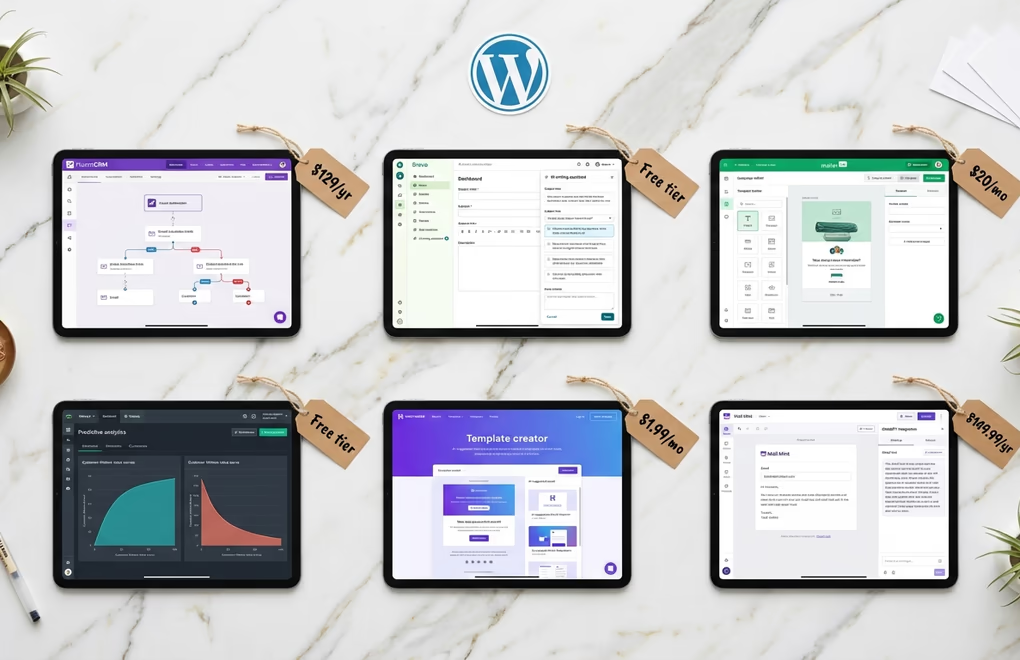
Not every plugin claiming AI features actually delivers on the promise. Some just wrap a basic ChatGPT text field into the interface and call it intelligent email marketing. The plugins below offer real AI capabilities that integrate with WordPress data, and every price reflects current 2026 rates verified at the time of writing.
FluentCRM is a self-hosted marketing automation plugin, meaning all your subscriber data stays in your WordPress database and never touches an external server. The visual automation builder creates complex email flows triggered by WordPress events like form submissions, WooCommerce purchases, membership signups, and LMS enrollments. The Pro version includes AI-powered email building for generating copy and images directly inside the visual builder. Because FluentCRM doesn’t charge per subscriber, your only variable cost is your SMTP provider, and services like Amazon SES handle high-volume sending for pennies per thousand emails. Pricing starts at $129/year for a single site, with a free version available for basic email marketing.
Brevo (formerly Sendinblue) stands out for its generous free tier: up to 300 emails per day with support for up to 100,000 stored contacts. The built-in AI assistant generates subject lines and email copy using customizable prompts for tone, humor, urgency, and power words. The WordPress plugin has over 100,000 active installations and takes about five minutes to configure. Enter your API key and contacts sync automatically. Predictive send-time optimization is available on the Business plan starting at $18/month, while the Starter plan at $9/month covers higher sending limits for growing lists.
MailerLite packages its AI writing tools into the Advanced plan at $20/month for up to 500 subscribers. The AI generates subject lines, email content, and even complete campaign drafts based on your product descriptions or previous campaigns. What sets MailerLite apart is its excellent WordPress integration for ecommerce sites, with native WooCommerce syncing that automatically segments customers by purchase behavior. The free plan supports up to 500 subscribers with 12,000 monthly emails, making it a solid starting point before upgrading to AI features.
Klaviyo has become the go-to choice for serious WooCommerce stores, and its AI capabilities justify the premium pricing. The platform analyzes customer behavior across your entire site to predict future purchases, identify at-risk customers, and optimize send times automatically. Their predictive analytics can tell you which subscribers are most likely to buy in the next 30 days, letting you focus your efforts where they’ll have the biggest impact. Pricing is usage-based starting around $45/month for 1,500 contacts, scaling up from there.
Omnisend offers a middle ground between basic email tools and enterprise platforms, with strong AI features at accessible price points. Their AI content generator creates email copy, subject lines, and product descriptions based on your catalog. The automation library includes pre-built workflows for abandoned carts, welcome sequences, and win-back campaigns that you can activate with minimal customization. Free plan covers up to 250 contacts with 500 monthly emails, while paid plans with AI features start at $16/month.
Five Essential Email Automations Every WordPress Site Needs

Once you’ve chosen your email platform, these five automations will drive the majority of your email revenue. The beauty of automated flows is that you set them up once and they run continuously, generating sales while you focus on other parts of your business. Each of these integrates naturally with WordPress and WooCommerce data.
Welcome sequences are your first impression, and they set the tone for your entire email relationship. When someone subscribes to your list, they’re at peak interest in what you have to offer. A well-crafted welcome series, typically 3-5 emails over 7-10 days, introduces your brand, delivers immediate value, and guides new subscribers toward their first purchase. AI helps here by personalizing content based on how the subscriber joined your list, whether through a specific product page, a blog post, or a homepage popup.
Abandoned cart recovery is arguably the highest-ROI automation you can implement. When someone adds products to their cart and leaves without buying, you’re looking at a warm lead who was moments away from purchasing. A timely reminder, usually sent 1-4 hours after abandonment, followed by one or two additional emails over the next few days, recovers a significant portion of otherwise lost sales. AI optimizes this by testing different subject lines, adjusting send times based on individual behavior, and even recommending related products to sweeten the deal. If you sell courses or digital downloads, our guide to WordPress course abandoned cart recovery covers the sequences that work best for digital goods.
Post-purchase follow-ups turn one-time buyers into repeat customers. After someone makes a purchase, you have a window to build the relationship and encourage future purchases. A post-purchase sequence might include order confirmation with tracking, a check-in asking about their experience, tips for getting more value from their purchase, and eventually product recommendations for complementary items. AI analyzes purchase history to recommend products each customer is actually likely to want, rather than sending generic promotions.
Browse abandonment emails target a different stage in the customer journey. When someone views product pages without adding anything to cart, they’re showing interest without committing. A browse abandonment email, sent a few hours later, reminds them of what they were looking at and often includes an incentive to take the next step. These work particularly well for higher-priced items where customers take time to decide. AI improves these by identifying which products and price points warrant follow-up and which browsing sessions were just casual window shopping.
Win-back campaigns re-engage customers who haven’t purchased in a while. Every customer list includes people who bought once or twice and then went quiet. A win-back sequence, typically triggered 60-90 days after their last purchase, reminds them you exist and gives them a reason to return. These emails often include special offers or showcase new products they might have missed. AI helps by predicting which inactive customers are most likely to respond and tailoring the messaging to their previous purchase behavior.
Setting Up AI Email Marketing on Your WordPress Site

Getting started with AI email marketing on WordPress isn’t as complicated as it might seem, but there are a few decisions to make upfront that will affect everything else. The good news is that most of the popular email platforms have streamlined their WordPress integrations significantly in recent years.
Start by choosing between a self-hosted solution like FluentCRM or a cloud-based platform like Brevo, MailerLite, or Klaviyo. Self-hosted means your data stays on your server and you have more control, but you’re responsible for deliverability and maintenance. Cloud-based means the provider handles the infrastructure, but your subscriber data lives on their servers and costs scale with list size. For most WordPress sites starting out, cloud-based platforms are simpler to set up and maintain.
Once you’ve chosen a platform, install the WordPress plugin and connect it to your account using the API key provided. This typically takes about five minutes. Next, you’ll want to sync your existing contacts and connect your WooCommerce store if you have one. Most plugins handle this automatically, pulling in customer data, purchase history, and product information so the AI has context to work with.
Configure your email capture forms next. Most platforms include their own form builder, but you can also connect to popular form plugins like WPForms, Gravity Forms, or Fluent Forms. Place signup forms strategically across your site: a popup for first-time visitors, an embedded form in your sidebar or footer, and inline forms within your best-performing content. Each form should offer a specific reason to subscribe, not just a generic “sign up for our newsletter” request.
Now build your first automation. I recommend starting with a welcome sequence since everyone who joins your list will flow through it. Create 3-5 emails spaced over about a week, with each email serving a specific purpose: introduce your brand, deliver your lead magnet if you offered one, share your most valuable content, and make a soft pitch for your products or services. Use the AI writing tools to generate drafts, but always review and personalize the output to match your brand voice.
Test everything before going live. Send test emails to yourself and colleagues to check formatting, links, and personalization tokens. Run through your automation triggers to make sure emails fire when expected. Check your emails on both desktop and mobile since the majority of emails are now opened on phones. Once you’re confident everything works, activate your automations and start monitoring performance.
Common Mistakes That Sabotage AI Email Performance

Even with powerful AI tools at your disposal, certain mistakes can quietly undermine your email marketing performance. I’ve seen WordPress sites with great products and engaged audiences struggle with email simply because they fell into one of these common traps.
Trusting AI output without review is the most tempting mistake. AI writing tools can generate email copy quickly, but they don’t understand your brand voice, your audience’s pain points, or the nuances of your products the way you do. Always treat AI-generated content as a first draft that needs human refinement. Read every email out loud before sending it. If it doesn’t sound like something you’d actually say to a customer, rewrite it until it does.
Sending too many emails too fast drives unsubscribes and spam complaints. Just because you can automate unlimited email sequences doesn’t mean you should. Give subscribers breathing room between messages. A good rule of thumb is no more than 2-3 emails per week unless you have explicit permission for daily communication. Monitor your unsubscribe rates closely, and if they spike after launching a new automation, dial back the frequency.
Neglecting list hygiene destroys deliverability over time. Email platforms track how recipients interact with your emails, and sending to people who never open creates a negative signal. Regularly remove subscribers who haven’t engaged in 6-12 months. Before removing them permanently, try a re-engagement campaign asking if they still want to hear from you. Those who don’t respond should be cleaned from your list to protect your sender reputation.
Ignoring mobile optimization is inexcusable in 2026 but still surprisingly common. Most of your subscribers will open your emails on their phones, and if the experience is poor, they’ll delete without reading. Use single-column layouts, large tap-friendly buttons, concise copy, and images that load quickly. Test every email template on an actual phone before deploying it.
Setting automations and forgetting them leads to stale content and missed opportunities. Review your automated sequences quarterly to update product mentions, refresh dated content, and improve underperforming emails. Check that all links still work and that any referenced promotions are still valid. AI can help identify which emails have declining performance, but you need to actually look at the data and take action.
Start Building Your AI Email Engine Today
AI-powered email marketing on WordPress isn’t complicated to set up, and the payoff is substantial. The combination of behavioral data from your site, intelligent automation tools, and AI-generated content creates an email engine that works for you continuously. You set up the flows once, optimize them over time, and let the system generate revenue while you focus on growing your business. Running a digital product store? Our complete guide to selling digital products on WordPress pairs perfectly with these email strategies.
Start with a welcome sequence and abandoned cart recovery. Those two automations alone will likely generate more revenue than anything else you do with email. Once those are running smoothly, add post-purchase follow-ups, browse abandonment, and win-back campaigns. Use AI to write first drafts and optimize send times, but keep a human eye on everything to maintain your brand voice and catch mistakes before they reach customers.
The tools are ready, the integrations work well, and the results speak for themselves. For a side-by-side look at the leading WordPress options, our email marketing plugin comparison breaks down pricing and features across MailPoet, FluentCRM, and Brevo. What’s holding you back from turning your WordPress email list into a real revenue channel?



0 Comments on "WordPress AI for Email Marketing: How to Build Automated Campaigns That Convert in 2026"