
SamCart charges $79 to $199 per month for checkout pages and digital product delivery, and WordPress site owners are paying that bill on top of hosting they already own. A samcart alternative built as a WordPress plugin gives you the same checkout, subscription, and affiliate features for a flat annual fee, with your data stored on your own server instead of a third-party platform.
DigiCommerce is that alternative, a WordPress plugin that turns any WordPress site into a digital storefront with file delivery, subscription billing, abandoned cart recovery, and an affiliate program, all for $129 per year as part of the DigiCommerce Pro bundle. That’s roughly what SamCart charges for six weeks on its cheapest plan.
This page breaks down the real differences between SamCart and a WordPress-native approach: features, pricing, payment gateways, and the specific situations where each option makes more sense. Every price and feature listed here was verified directly from each platform’s current pricing page, so you’re comparing real numbers instead of marketing claims.
If you already run WordPress and you’re tired of sending $948 or more per year to a hosted checkout platform, the math alone is worth a closer look. But cost isn’t the only factor, so we’ll cover where SamCart still has an edge and where DigiCommerce pulls ahead.
Why are WordPress site owners leaving SamCart?
The most common reason is straightforward: SamCart is expensive relative to what WordPress site owners actually need. The Core plan costs $79 per month, but it doesn’t include one-click upsells, order bumps, A/B testing, or the affiliate center. Those features sit behind the Pro plan at $199 per month, which works out to $2,388 per year for a checkout system that lives on someone else’s servers.
For someone selling a handful of digital products, courses, or templates, that’s a steep annual cost layered on top of WordPress hosting they’re already paying for. The hosted model made sense when WordPress didn’t have capable e-commerce plugins for digital goods, but that gap closed years ago. Plugins like DigiCommerce handle file delivery, licensing, and subscriptions directly inside WordPress, which means one fewer platform to manage and one fewer monthly charge to justify.
There’s also the data ownership question. With SamCart, your customer records, purchase history, and email lists live on SamCart’s infrastructure. If you cancel or they change terms, exporting that data can be difficult. A self-hosted WordPress plugin keeps everything in your own database, on your own hosting, under your full control. You can back it up, migrate it, or query it directly without API limits or export restrictions.
Payment gateway flexibility is another pain point. SamCart pushes its own payment processing (SamPay) on the Core plan and only opens third-party processor support on the Pro tier. WordPress plugins typically let you connect Stripe, PayPal, or any gateway from day one, with no tier gating on which processor you’re allowed to use.
The last sticking point is vendor lock-in. Building your entire checkout flow on a hosted platform means rebuilding everything if you ever switch. With WordPress, your pages, products, and checkout flows live inside your CMS. You can swap plugins without losing your site structure, your SEO, or your content. That portability matters more than most sellers realize until they’re stuck rebuilding checkout pages from scratch on a new platform because their old one changed pricing or dropped a feature they depended on.
There’s also a practical workflow issue. SamCart lives outside your WordPress dashboard, which means managing products in one tab and content in another. Every time you want to update a sales page, you’re switching between two separate systems with different editors, different design tools, and different login credentials. A WordPress-native plugin consolidates that workflow into the same dashboard you already use for posts, pages, and media, which saves time on a daily basis even if the feature sets are identical.
How does DigiCommerce compare to SamCart on features?
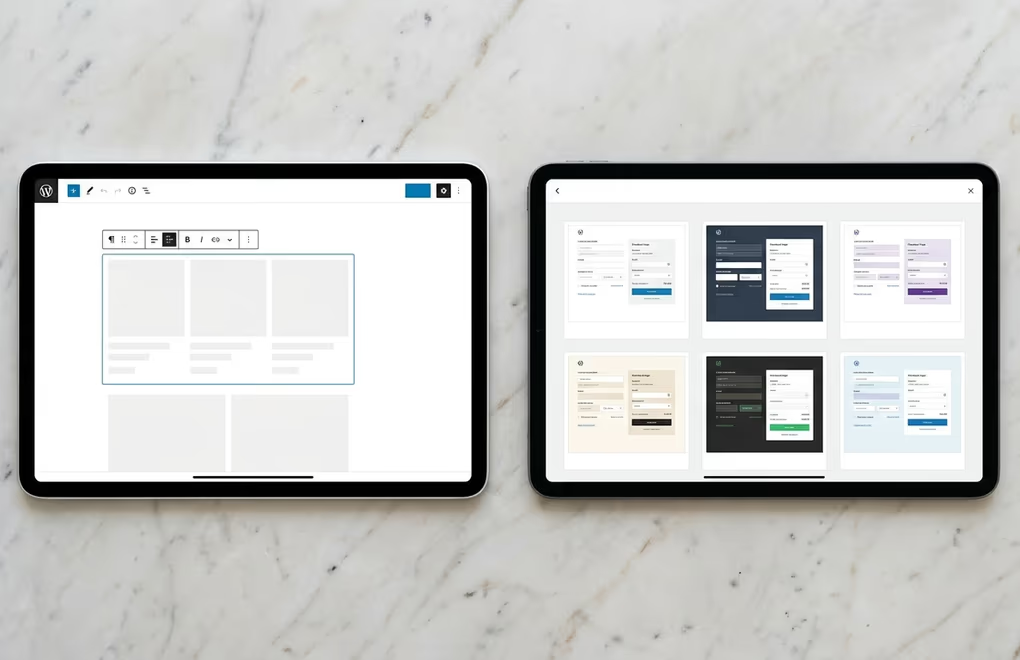
Both platforms handle the core job of selling digital products, but they approach it differently. SamCart is a standalone hosted checkout builder. DigiCommerce is a WordPress plugin that adds e-commerce directly to your existing site. The feature sets overlap substantially, with a few gaps on each side.
Checkout and product pages are SamCart’s main selling point. It provides a drag-and-drop builder for standalone checkout pages with templates, A/B testing (Pro only), and built-in cart abandonment emails. DigiCommerce handles checkout within WordPress using DigiBlocks, the same block editor your pages already use. You don’t get a separate drag-and-drop checkout builder, but you do get full control over the page through Gutenberg, which is arguably more flexible if you already know WordPress.
For digital product delivery, both platforms automate file access after purchase. DigiCommerce adds a built-in booking system for service-based products, which SamCart doesn’t offer natively. If you sell consulting sessions or appointments alongside digital downloads, that’s one fewer plugin to install.
Subscription management is available on both. SamCart’s Pro plan includes a “Subscription Saver” that tries to recover failing payments automatically. DigiCommerce supports recurring billing and subscription products as part of the standard plugin, without a tier upgrade requirement.
Affiliate programs are where the tier gating hurts SamCart users the most. The affiliate center is locked behind the $199/month Pro plan. DigiCommerce includes its affiliate system in the base plugin, so you can run referral programs from day one at the same $129/year price. For small and mid-size creators, paying $2,388/year just to access affiliate tracking is a hard sell when the same feature comes bundled at a fraction of the cost.
Where SamCart has a genuine advantage is in its AI-powered design tools and pre-built, conversion-optimized checkout templates. If you want a polished standalone checkout page without touching code or learning WordPress, SamCart’s builder is faster out of the box. DigiCommerce assumes you’re comfortable with the WordPress editor, which is a different skill set.
What does SamCart really cost compared to a WordPress plugin?

The sticker prices don’t tell the full story, so here’s the actual math for a year of selling digital products on each platform.
SamCart’s Core plan costs $79 per month, or about $71/month if you pay annually (roughly $852/year). That gets you unlimited products, checkout pages, cart abandonment, and the AI assistant, but no upsells, no A/B testing, and no affiliate program. The Pro plan costs $199/month, or roughly $149/month on annual billing ($1,788/year), which adds all the conversion and affiliate features most serious sellers need.
DigiCommerce comes inside the DigiBundle at $129 per year for one website. That single price includes DigiCommerce Pro (e-commerce, subscriptions, affiliates, abandoned cart recovery), DigiBlocks Pro (60+ Gutenberg blocks), DigiFlash Pro (a block theme), and DigiConsent Pro (cookie compliance). All features are available on every tier; the only variable is how many websites you can run it on ($229/year for 10 sites, $529/year for 500).
You do need WordPress hosting on top of DigiCommerce, but if you’re reading this page, you probably already have it. Shared WordPress hosting runs $3 to $10 per month, and managed hosting sits around $20 to $50. Even at the high end of managed hosting, your total annual cost (hosting plus DigiCommerce) stays well under SamCart’s Core plan alone.
Transaction fees add another layer to the comparison. SamCart charges no added fees on its SamPay processor (which has its own standard 2.9% + $0.30 rate), and Pro users can connect their own Stripe or PayPal with their standard processing rates. DigiCommerce doesn’t touch your transactions at all; you pay only your payment gateway’s standard rate (Stripe’s 2.9% + $0.30, for instance). There’s no platform markup and no percentage cut taken by DigiCommerce itself.
Over three years, SamCart Pro costs roughly $5,364 in platform fees alone. DigiCommerce costs $387 for the same period. The feature set is different, but for WordPress site owners selling digital products, the $4,977 gap buys a lot of hosting upgrades, marketing spend, or product development.
Can you run subscriptions and digital courses without SamCart?

Yes, and it’s one of the areas where a WordPress-native setup actually has more flexibility than a hosted checkout page. SamCart added a Courses App to its feature set, which lets you build and deliver course content directly inside SamCart. But the course builder is relatively basic compared to dedicated WordPress LMS plugins, and it ties your course content to SamCart’s platform. If you leave SamCart, your course structure doesn’t come with you.
DigiCommerce handles the payment and access-control side of courses: recurring subscriptions, one-time course purchases, and automatic file or content delivery after payment. For the actual course content (lessons, quizzes, progress tracking), you’d pair it with a WordPress LMS plugin or build your lesson structure with pages and content restrictions. The upside is that your course content stays in WordPress regardless of what e-commerce plugin you use. The downside is that it’s two plugins instead of one dashboard.
For pure subscription products like memberships, software licenses, or recurring digital deliveries, DigiCommerce manages the billing cycle, sends renewal reminders, and handles failed payment retries. SamCart’s Pro plan includes its “Subscription Saver” for the same purpose, but again, that feature requires the $199/month tier. On DigiCommerce, subscription management is part of the base product at $129/year.
If you’re running a WordPress membership site with gated content and recurring billing, a plugin-based approach gives you more control over how members interact with your site. Your member area is a real WordPress page with your theme, your navigation, and your design, not a separate hosted portal that looks different from the rest of your brand.
The practical takeaway: SamCart is simpler for someone who wants subscriptions and a basic course builder without thinking about WordPress at all. DigiCommerce is stronger when you want subscription billing integrated into a site you fully control, with the freedom to pair it with any course or membership solution that fits your needs. And because DigiCommerce stores all subscriber and customer data in your WordPress database, you can run custom queries, build segments for email marketing, or export records at any time without hitting API rate limits or waiting for SamCart’s export tool to process your request.
Which payment gateways and checkout options does each platform support?

Payment gateway support is one of SamCart’s most criticized limitations, and it’s where a WordPress plugin typically wins without trying. SamCart’s Core plan includes SamPay, their built-in processor powered by Stripe. You can accept credit cards and PayPal through SamPay, but you can’t connect your own Stripe account or any other processor until you upgrade to the Pro plan at $199/month.
That means Core users can’t negotiate their own processing rates with Stripe, can’t use a regional payment gateway, and can’t add alternative payment methods beyond what SamPay supports. For businesses outside the United States, or for anyone who wants Apple Pay, Google Pay, or localized payment methods like Bancontact or iDEAL, the Core plan is a dead end.
DigiCommerce connects to Stripe and PayPal from the start, with no tier restriction. You use your own Stripe account, which means you negotiate your own rates, keep direct access to your Stripe dashboard, and can enable any payment method Stripe supports in your country. That includes Apple Pay, Google Pay, SEPA Direct Debit, Klarna, Afterpay, and dozens of local payment methods depending on your region.
Checkout customization is another area of divergence. SamCart provides a standalone checkout page builder with conversion-focused templates: order bumps, one-click upsells, countdown timers, and trust badges are all built into their editor. DigiCommerce handles checkout inside WordPress, which means your checkout page matches your site’s theme automatically. You can add any Gutenberg block to the page, use custom CSS, or install additional block plugins for elements like testimonials or countdown timers. It’s more manual than SamCart’s template approach, but the result is a checkout that doesn’t redirect customers to a separate domain or break your site’s visual consistency.
For WordPress e-commerce plugin users who already manage their store in the WordPress dashboard, adding DigiCommerce keeps everything in one place. You don’t need to learn a second platform’s interface or jump between SamCart and WordPress to manage products, content, and design.
Picking the right tool for how you actually sell
SamCart is a strong product for sellers who don’t run WordPress and want a standalone checkout page with minimal setup. If your entire business is a checkout link shared on social media, and you don’t need a full website behind it, SamCart’s builder and templates will get you selling faster than any WordPress setup.
But if you already have a WordPress site, paying $948 to $2,388 per year for hosted checkout pages is hard to justify when DigiCommerce delivers the same core features for $129/year as part of a bundle that also includes blocks, a theme, and cookie compliance. You keep your data, you own your checkout pages, and you don’t pay a platform tax on features like affiliates and subscriptions.
The right choice depends on whether you want simplicity outside WordPress (SamCart) or full control inside it (DigiCommerce). For most WordPress site owners selling digital products, courses, or subscriptions, the WordPress-native path saves money and keeps your entire business under one roof instead of spread across two platforms.
